Cybersecurity Knowledge Base
CyberPedia
Your essential guide to cybersecurity threats, attacks, and defenses. Understand the risks. Protect your business.
Beaconing
Reading time: 6 min · Updated May 2026
IN SHORT
Beaconing is the recurring pattern of a compromised device checking in with an attacker-controlled system for instructions. Each check-in is usually small, quiet, and designed to blend in with normal internet traffic, which helps the attacker maintain access without drawing attention
What is beaconing?
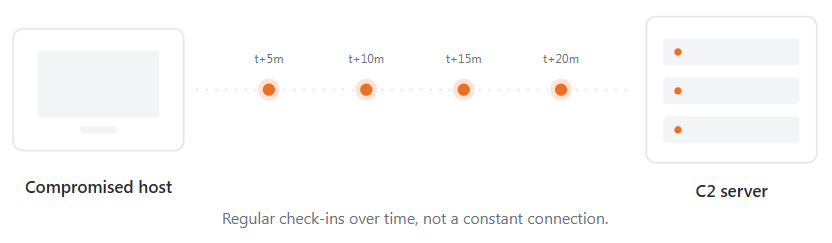
Beaconing is a communication pattern commonly used after malware, a remote access trojan, or another unauthorized foothold lands on a device. Instead of maintaining a noisy, always-on connection, the compromised host periodically “phones home” to ask whether there are new commands to run, data to send, or tasks to perform.
That repeating call-home behavior is what defenders mean by beaconing. It is not a malware family by itself; it is the check-in pattern that lets an attacker stay in touch with an infected system over time.
In plain terms, beaconing is the quiet heartbeat of an active compromise. It often continues in the background for hours, days, or longer while the attacker waits, gathers information, moves laterally, or prepares the next stage of the intrusion.
How a beacon works
The basic pattern is simple, deliberate, and easy to miss in a sea of legitimate web traffic.
Compromised host
An infected laptop, server, virtual machine, or container remains inside the environment and keeps running the malicious code.
Receives orders
The host may receive instructions, upload small results, confirm it is still active, and then go quiet again until the next interval.
Calls C2 server
It connects to the attacker’s command-and-control (C2) infrastructure, often over a protocol that already looks normal in most networks, such as HTTPS or DNS.
Scheduled check-in
On a timer, or with some randomness added to avoid detection, the host opens a brief outbound connection.
01
02
03
04


THE BEACON RHYTHM
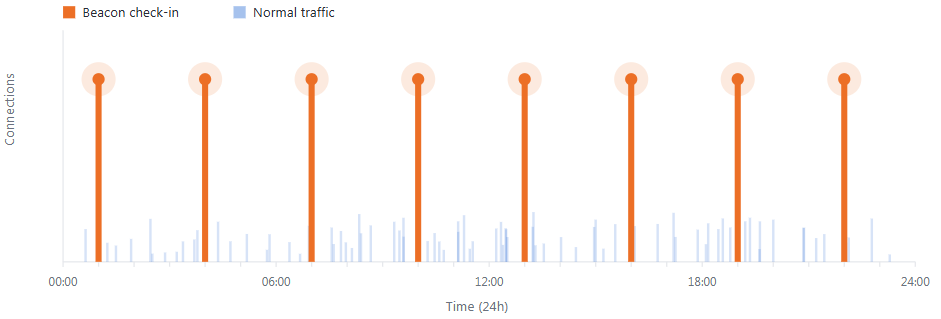
What makes beaconing recognizable is not usually the payload. It is the pattern: the same or similar destination, a repeated interval, and small exchanges that recur over time.
Common beacon channels
Attackers prefer channels that already look normal in your network. The goal is to disappear inside everyday traffic. Here are a few common ways that pattern shows up on the wire.
 HTTPS to a specific domain
A process quietly connects to the same rare or low-reputation domain every few minutes. The traffic is encrypted, but the destination, timing, and connection pattern may still stand out.
 DNS-based beaconing
A host repeatedly queries unusual or randomly generated domain names, sometimes to receive tiny instructions or confirm reachability. In some cases, attackers abuse DNS records to pass small amounts of data.
 Cloud or API abuse
Instead of talking directly to obviously malicious infrastructure, the malware may use cloud storage, chat platforms, code repositories, or SaaS APIs as a relay. That makes the traffic harder to distinguish from legitimate business activity.
 Low-and-slow beacons
Some malware checks in only every few hours or even once a day. The pace is intentionally slow so it stays below simple thresholds and avoids looking like a bursty network event.
Why attackers rely on beaconing
Beaconing is a core part of modern command-and-control. It allows an attacker to keep a foothold on many compromised systems without maintaining a constant, noisy connection that would be easier to detect or block.
Because the compromised host initiates the traffic outbound, beaconing often passes through networks that are much stricter about inbound traffic than outbound traffic. That asymmetry is one reason beaconing remains effective across business networks, remote users, and cloud-connected devices.
 BUSINESS IMPACT
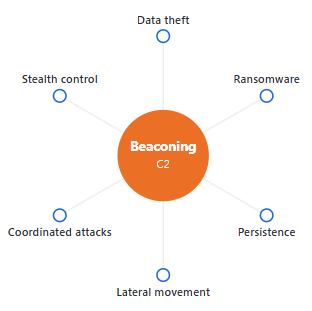
Ongoing remote control of affected systems.
Stealthy, incremental data exfiltration.
Coordinated actions across multiple infected hosts.
A staging point for ransomware or destructive follow-on activity.
Persistent access that can survive user logouts, reboots, or incomplete cleanup.
How to detect beaconing
One connection rarely tells the story. The pattern over time is what matters.

Tie traffic to a process
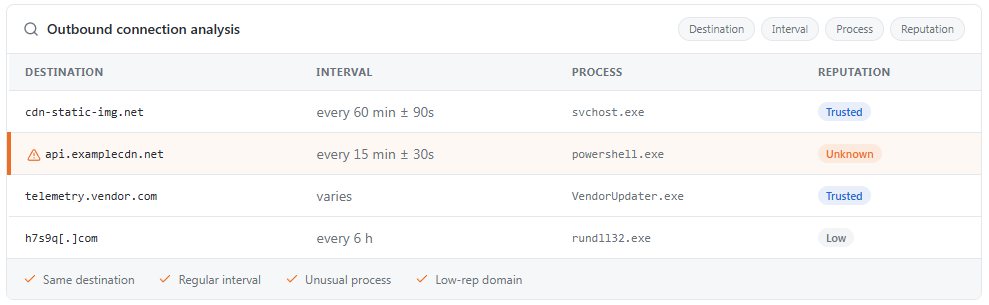
Ask which binary, script, service, or parent process made the connection. A legitimate updater contacting a known vendor is very different from PowerShell, WScript, Rundll32, or an unknown executable making periodic outbound calls.

Look for rhythm, not content
Repeated outbound connections to the same destination at consistent or near-consistent intervals are one of the strongest clues. Exact regularity is not required; many modern beacons introduce jitter to avoid looking perfectly timed.

Inspect DNS activity
Repeated lookups for random-looking domains, unexpectedly frequent TXT queries, or domains with no obvious user or business purpose can indicate beaconing or related command-and-control behavior.

Use behavior baselines
Detection improves when you know what “normal” looks like for each host, user, subnet, or workload. Systems that learn ordinary traffic patterns can surface quiet anomalies that would be easy to miss in raw logs.

Correlate across tools
Firewall, proxy, DNS, EDR, and identity telemetry are much more valuable together than alone. A suspicious destination is more actionable when you can also see the responsible process, user context, device history, and any related alerts.
What beaconing is not
Not every regular outbound connection is malicious. Software updaters, endpoint agents, browsers, collaboration apps, and cloud services all “call home” in ways that can appear repetitive.
The difference is context. Legitimate traffic is usually tied to a known application, a reputable destination, an expected certificate chain, and a normal business function; beaconing often involves unusual destinations, odd parent processes, inconsistent device context, or timing that serves no legitimate operational purpose.
How to defend against beaconing-based C2
You cannot eliminate all outbound traffic, but you can make attacker-controlled communication much harder to establish, hide, and maintain.
Hunt quickly when beacons appear
Treat confirmed beaconing as evidence of an active intrusion, not just a policy violation. Isolate the host when needed, investigate persistence, review lateral movement, and look for second-stage payloads or related compromised accounts.
04
Combine endpoint and network visibility
Correlate network logs with endpoint telemetry so you can see both the connection and the process behind it. This is especially important when attackers abuse encrypted traffic or legitimate cloud services.
03
Use threat intelligence and domain controls
Block known-malicious domains and IPs, and scrutinize traffic to newly registered, low-reputation, or previously unseen destinations.
02
Restrict outbound connectivity
Limit which systems can reach the internet directly, and apply egress controls by destination, protocol, role, and segment. Servers, administrative systems, and sensitive workloads should rarely have unrestricted outbound access.
01
THE BOTTOM LINE
Beaconing is the quiet signal of a compromise that may still be active. Catching it early by analyzing patterns, destinations, and process context can stop an intrusion before it turns into data loss, ransomware, or broader network compromise.
Want a bit more detail?
Common follow-up questions about beaconing and C2 traffic.
Yes, and that is exactly why beaconing can be hard to spot. Updaters, telemetry agents, browsers, and cloud apps all check in regularly, but legitimate traffic usually goes to known vendors and is tied to a recognizable process and business purpose.
Encryption hides the contents, not the existence of the connection. Defenders can still analyze metadata such as timing, destination, frequency, request size, TLS characteristics, and the process making the connection.
Low-and-slow beaconing is when malware checks in infrequently enough to avoid attracting attention. Instead of reaching out every few minutes, it may wait for hours or longer, sometimes adding randomness so the pattern is less obvious.
It is strong evidence that warrants immediate investigation, but context matters. Some legitimate tools can look beacon-like, so the next step is to validate the destination, process, certificate details, user activity, and any related security events.
Yes. Smaller organizations are often targeted because they may have leaner monitoring and response coverage, and a single compromised endpoint or Microsoft 365 account can still lead to fraud, data theft, or ransomware.

