Cybersecurity Knowledge Base
CyberPedia
Your essential guide to cybersecurity threats, attacks, and defenses. Understand the risks. Protect your business.
Attack Surface
Reading time: 8 min · Updated May 2026
IN SHORT
Your attack surface is the total set of ways someone could try to interact with your systems, data, or people on the way into your organization. Every public website, login portal, employee device, cloud account, and third‑party vendor adds to it. The larger and messier that surface is, the more chances attackers have to find something weak or forgotten, and the harder it becomes for you to keep everything secure.
Your attack surface is where attacks can happen.
Vulnerabilities are the weaknesses on that surface.
Threats are the people, malware, and events that try to exploit those weaknesses.
What is an attack surface?
An attack surface is everything an attacker could potentially touch, probe, or interact with in order to affect your business. It’s not a single product or system. It’s the sum of all the places you’re exposed — technically, procedurally, and through your people.
That includes:
Obvious technical entry points like websites, VPNs, email, and remote‑access tools
Less obvious ones like forgotten test servers, old domain names, or “temporary” SaaS accounts
Human and process entry points like staff who can be phished or business workflows that can be tricked
In simple terms: your attack surface is all the doors, windows, and cracks into your organization — whether or not they’re currently locked.
A simple mental model
A practical way to think about attack surface is:
See it – Know what you actually have exposed
Shrink it – Turn off or remove what you don’t need
Strengthen it – Harden what must stay online
Watch it – Continuously look for changes and new exposure
Most attack‑surface problems come from gaps in one of these four steps.
External vs. internal attack surface
It helps to separate what an outsider can see from what becomes reachable once someone has a foothold.
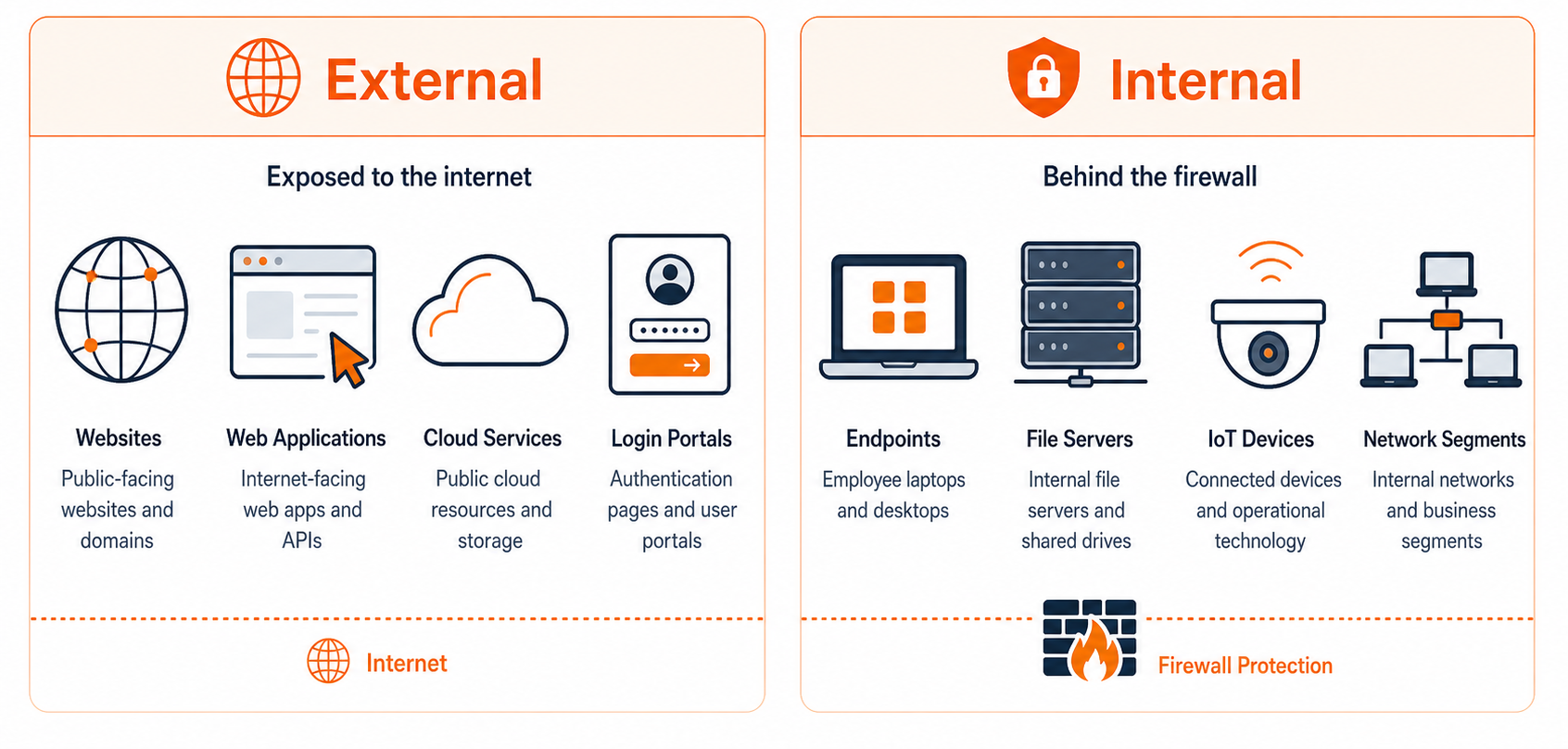
What makes up an attack surface
Most organizations’ exposure tends to cluster into four broad areas. Each needs different attention.
 Internal systems and networks
Internal line‑of‑business applications
File shares and collaboration tools
Endpoints: laptops, desktops, and mobile devices
Network gear, IoT devices, printers, and phones
Management and admin tools (RMM, hypervisors, cloud consoles)
 Digital points of entry
Public websites, web apps, and customer portals
VPNs and remote‑access services
Email servers, spam filters, and forwarding rules
Cloud services and APIs exposed to the internet
Internet‑reachable servers and open ports
 People and processes
Staff targeted by phishing, social engineering, and deepfake scams
Help desks and support teams that can be tricked into password resets or new access
Finance and payment approvals (for example, invoice and wire‑transfer workflows)
HR and onboarding/offboarding processes that create and retire access
 Third parties and supply chain
Vendors and partners with VPN or portal access
SaaS applications that hold or sync company data
Outsourced IT and managed support providers
Software dependencies and integrations that connect systems together
Attackers treat all of these as one combined surface. Whether the weak point is a forgotten website, an over‑privileged SaaS integration, or a rushed payment approval, the result is the same: access to your business.
Why your attack surface matters
The bigger and more complex your attack surface, the more opportunities attackers have to find a weak spot — and the harder it becomes to monitor everything well.
Most breaches don’t start with a clever, cutting‑edge exploit. They start with something routine and overlooked: an old portal that never got shut down, a stale admin account, a misconfigured cloud bucket, or a vendor login nobody tracks anymore.
Reducing your attack surface means shrinking and hardening the set of things you expose to the world. That gives attackers fewer paths in, and forces them through better‑defended doors.
“We’re small. Do we really have a big attack surface?”
Even small and midsize businesses are often surprised by how wide their exposure is. A typical 10–50 person organization might have:
A main website, a marketing site, and a few test or legacy subdomains
Microsoft 365 or Google Workspace, with multiple admin portals
Several SaaS tools for CRM, finance, HR, ticketing, and collaboration
Remote‑access tools for IT support and vendor access
Employee devices connecting from homes, cafes, and travel
Without deliberate control, that footprint grows a little every month — not because anyone chose it, but because new tools, accounts, and exceptions accumulate over time.
 COMMON CONSEQUENCES
- More opportunities for attackers to find a weakness
- Harder to monitor every system effectively
- Higher chance of forgotten or unpatched assets
- Slower detection when something goes wrong
- Bigger blast radius if one system is breached
Everyday examples that quietly grow your attack surface
None of these look dangerous by themselves. They become risky because they’re forgotten, unmanaged, or just pile up.

Test and demo environments exposed
Staging, QA, or demo sites that are reachable from the internet.
Risk: These often run with weaker security and reused credentials.

Unused open ports and services
Network services nobody uses, but nobody has turned off.
Risk: Attackers scan for these 24/7 and will eventually find one that’s exploitable.
Old systems left online
Websites or applications that are still running but no longer maintained or patched.
Risk: A known vulnerability in an old framework or server stack becomes an easy entry point.

Excessive privileges and “temporary” exceptions
Staff with admin rights they don’t need, or shared accounts created “just for now” that never get cleaned up.
Risk: One phish or compromised device now gives broad control.

Sprawling, untracked SaaS tools
Teams signing up for their own apps, each with its own logins and copy of your data.
Risk: Data and access spread across systems that IT and security don’t know about.

Oversharing technical details online
Posting internal screenshots, architecture diagrams, or technology stacks in public repos, forums, or social media.
Risk: This gives attackers a map of what you run and where to focus.
Over time, these small decisions quietly expand your attack surface far more than big, conscious technology projects.
How to manage and reduce your attack surface
There’s no single product that “fixes” your attack surface. A small set of disciplined practices, applied consistently, does most of the work.
Use this as a practical checklist:
See it: Inventory what you have
You can’t protect what you don’t know exists.
Build and maintain a list of your domains, subdomains, and public IP ranges
Identify all public‑facing websites, portals, APIs, and remote‑access services
Catalog business‑critical systems: on‑prem servers, cloud services, and SaaS apps
Include endpoints (laptops, desktops, mobiles) and vendor connections that can reach your data
Aim for “good enough and current” rather than “perfect once.” A lightweight inventory you keep updated beats a detailed spreadsheet nobody touches.
01
Shrink it: Remove what you don’t need
Every system you retire is one less thing that can be attacked.
Decommission old websites, test environments, and unused portals
Disable or close unused services and open ports on servers and firewalls
Shut down guest accounts, stale user accounts, and unneeded admin roles
Reduce shadow IT by providing supported alternatives and a simple way to request new tools
Start with the obvious: anything you no longer use in production, anything with no clear owner, and anything nobody can explain a business reason for.
02
Strengthen it: Harden what remains
For what must stay online, make each door harder to open.
Apply security patches regularly to operating systems, applications, and devices
Enforce strong authentication, especially multi‑factor authentication (MFA), on remote access, email, and admin consoles
Use secure default configurations: turn off public access unless required, disable deprecated protocols, and remove default accounts or passwords
Segment networks so that compromising one system doesn’t expose everything else
Focus first on high‑value, high‑exposure assets: email, identity systems, remote access, and customer‑facing applications.
03
Watch it: Monitor continuously
Your attack surface isn’t static. New assets, changes, and exceptions appear every week.
Watch for new public assets: domains, subdomains, open ports, and cloud services
Review logs for unusual or risky activity: failed logins, new admin accounts, or sign‑ins from unexpected locations
Periodically review vendor and SaaS access, and remove what’s no longer needed
Schedule regular attack‑surface reviews (for example, quarterly) to keep your inventory, controls, and assumptions up to date
Many teams handle the basics internally and get help with the more technical discovery and monitoring tasks. External assessments and ongoing monitoring can provide an extra set of eyes on changes you might miss.
04
Don’t forget people and vendors
Technology is only part of your surface.
Train staff to recognize phishing, social engineering, and “urgent” payment change requests
Standardize processes for approving payments, new vendors, and access changes, and make them hard to bypass
Review what access vendors, outsourced IT, and integration platforms have, and limit them to what’s strictly necessary
When people and processes are treated as part of the attack surface, it becomes easier to design them to be resilient.
05
THE BOTTOM LINE
You can’t defend what you can’t see. Understanding your attack surface, and trimming it back to what you actually need, is one of the highest‑leverage moves any organization can make to lower its cyber risk.
Want a bit more detail?
Common follow-up questions about attack surface management.
No. Your attack surface is where an attack could happen: all the systems, accounts, and processes an attacker might interact with. Vulnerabilities are the specific weaknesses on that surface (for example, an unpatched server or a weak approval process).
Attack Surface Management is the ongoing process of discovering, classifying, and monitoring your organization’s exposure, especially what’s visible from the internet. It typically combines automated scanning with human review and remediation planning.
Yes. Attackers rarely tailor their scans by company size; they scan the internet for weaknesses and then see who they belong to. Even small firms often present dozens of exposed services and accounts without realizing it.
At minimum, review it when you make major changes (new office, new cloud environment, mergers, or large new vendors). In practice, most organizations benefit from a structured review at least quarterly, plus continuous monitoring for new or unexpected exposure.
Common blind spots include test and legacy systems, SaaS tools adopted by individual departments, vendor access that was never cleaned up, and informal “temporary” exceptions that quietly become permanent.

