Cybersecurity Knowledge Base
CyberPedia
Your essential guide to cybersecurity threats, attacks, and defenses. Understand the risks. Protect your business.
Brute Force Attack
Reading time: 6 min · Updated May 2026
IN SHORT
A brute force attack is a trial‑and‑error method where an attacker uses software to try huge numbers of possible passwords, keys, or credentials until one works. It rarely looks dramatic; it’s mostly automated guessing at scale, hoping that somewhere in the system, a weak or reused password is waiting.
This article is for IT leaders, security teams, and business owners who need a practical understanding of password‑guessing attacks and what to do about them.
What a brute force attack involves
In a brute force attack, the attacker picks a target (a login page, an encrypted file, an API token) and points automated tools at it. Those tools fire off attempt after attempt: tens, thousands, sometimes millions of guesses, far faster than any human ever could.
The attack succeeds when one of two things is true: the password or key is weak enough to be guessed quickly, or the system on the other end doesn’t notice or limit how many attempts are being made.
Modern brute force is rarely one attacker hammering one account. Instead, it’s a network of compromised machines or cloud servers spreading attempts thinly across many accounts and many services to stay under the radar.
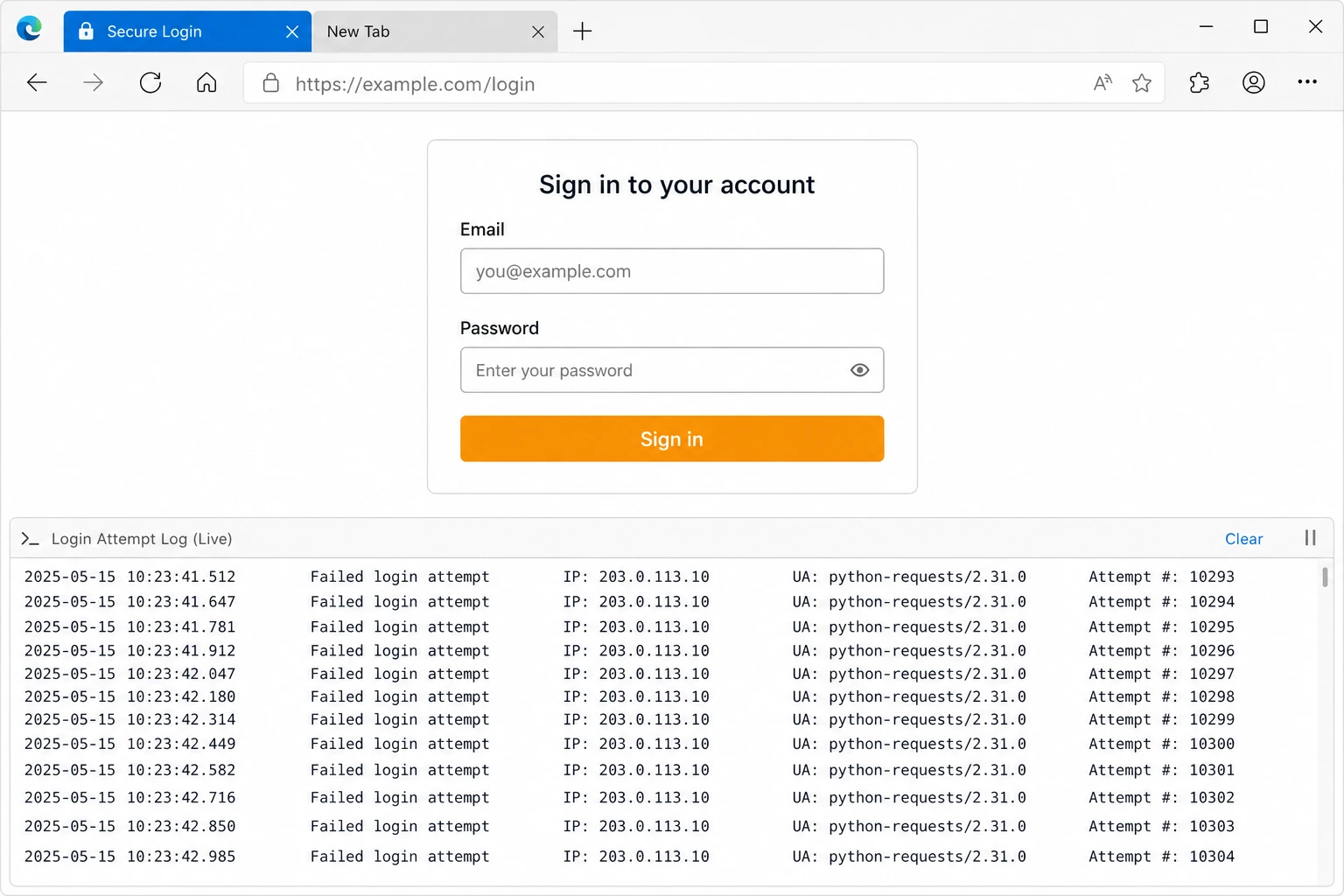
A typical brute force attempt: an ordinary-looking sign-in page, with automated tools quietly firing thousands of guesses in the background.
Common types of brute force attacks
“Brute force” is a family of techniques rather than one specific method. Each variant trades off speed, stealth, and the kind of password it’s best at cracking.

Simple (exhaustive) brute force
Tries every possible combination of characters. Like turning a combination lock through every digit in order. Effective on short passwords and weak encryption keys; quickly becomes impractical as length increases.

Dictionary attack
Uses long lists of common passwords and known leaks (“Password123!”, “Summer2024!”) instead of all combinations. Far faster when people pick predictable or reused passwords.

Hybrid attacks
Combine dictionary words with predictable variations, adding numbers, symbols, or capital letters at the end. Defeats most casual “password tweaks” such as “Password1!” or “Winter2025!!”.

Credential stuffing
Reuses username/password pairs leaked from other sites and tries them everywhere else. Relies on the fact that many people reuse the same credentials across email, banking, and business apps.

Offline cracking
The attacker already has stolen password hashes or encrypted data and runs guesses on their own hardware. Because no live system is involved, they can push hardware to the limit and try billions of guesses per second on weak hashing algorithms.

Password spraying
Tries one or two very common passwords (like “Spring2026!”) against many different accounts at once. Stays below per‑account lockout thresholds to avoid alarms, while still compromising any account that used the weak password.
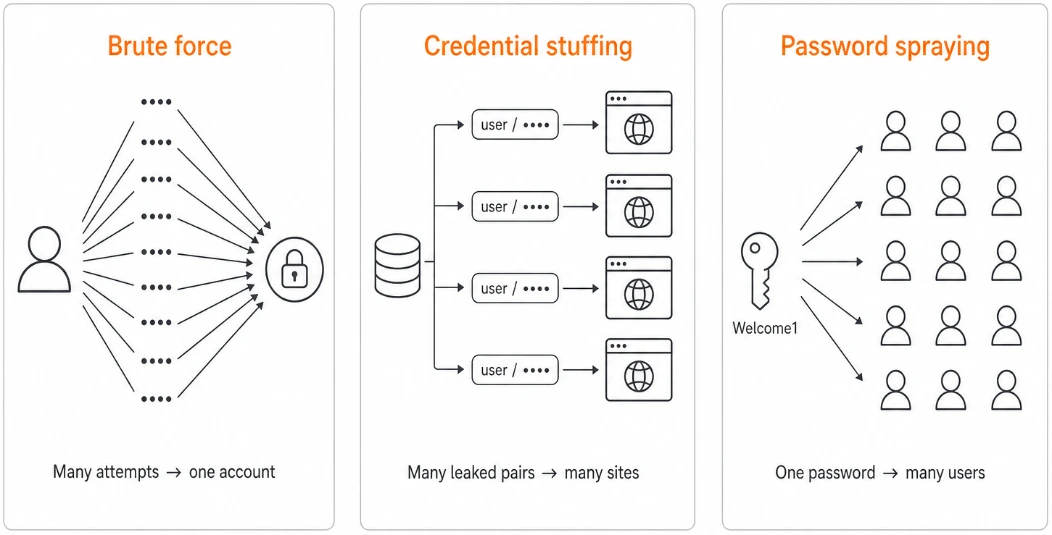
Brute force, credential stuffing, and spraying: what’s the difference?
Most real‑world “brute force” incidents are actually about credential abuse: using existing passwords at scale, not just guessing from scratch. A clear mental model helps you choose the right defenses.
Technique | What it does | Typical source | Best defenses |
|---|---|---|---|
Brute force | Guesses many passwords for one account or key | Automated tools against a login or hash | Long, unique passwords; rate limiting; MFA; strong password hashing |
Credential stuffing | Reuses known username/password pairs from other breaches | Breach dumps and dark‑web lists | Unique passwords; password managers; blocking known‑leaked passwords; MFA |
Password spraying | Tries a few common passwords across many accounts | Bots targeting many usernames at once | Lockout / throttling; blocking weak passwords; monitoring for same password across many accounts; MFA |
What attackers can achieve
A successful guess is rarely the end goal. It’s the foothold that opens the door to something more valuable.

Account takeover
Email, social media, VPN, cloud services, or banking. Anywhere a single password is enough to walk in. From there, attackers can reset other passwords, plant malware, or impersonate staff.

Privileged access
Admin or service accounts that can change settings, create new accounts, or reach across multiple systems. A single guessed admin password can shortcut many other security controls.

Decrypting protected data
If a passphrase or encryption key is weak, brute force can unlock encrypted files, archives, or backups taken offline. That can expose years of email, intellectual property, or regulated data in one shot.

Service disruption
Even failed attempts can cause damage. High‑volume guessing can lock users out, slow down login systems, and overwhelm authentication infrastructure.
Why brute force still works in 2026
It’s tempting to assume brute force is an old, solved problem. It isn’t. Cheap cloud computing, leaked password databases, and networks of compromised devices have made guessing faster and quieter than ever.
Today’s hardware can test billions of weak password hashes per second, and studies show that a large fraction of real‑world passwords fall in minutes or hours when outdated hashing and short passwords are used. The math behind passwords hasn’t changed, but the surrounding habits often haven’t either.
As long as a single guessed password can unlock an email account, VPN, or admin console, brute force remains a simple and profitable attack.
CONDITIONS THAT HELP ATTACKERS
- Short, common, or reused passwords
- No multi-factor authentication on the account
- Login systems with no rate limits or lockouts
- Stored passwords with weak or no hashing
- Little or no monitoring of failed sign-ins
Signs a brute force attempt may be in progress
Most attempts are noisy once you know what to look for. The patterns are unmistakable when monitoring is in place.

Unexpected account lockouts
Users suddenly locked out of accounts they didn’t try to access. A strong sign someone else is guessing on their behalf.

Logins from unfamiliar places
Successful sign‑ins from countries, devices, networks, or IP ranges the user has never used before.

Spikes in failed sign-ins
An unusual burst of incorrect password attempts on one account, or many small bursts spread across many accounts.

The same password, many accounts
One password being tried against dozens of usernames in a short window. The fingerprint of password spraying.

Bursts against a single service or protocol
A surge of login attempts to VPN, RDP, SSH, or a specific cloud app, especially from many IP addresses at once.

Traffic from known bad or automated sources
Large volumes of authentication traffic from data‑center IPs, anonymization networks, or known botnets.
How to defend against brute force attacks
No single setting stops every attempt, but a few well‑chosen controls make brute force expensive, slow, and easy to spot.
FOR INDIVIDUALS AND STAFF


FOR ORGANIZATIONS
Think in terms of “good, better, best” and move up over time.
Use long, unique passwords
Aim for passphrases of several random words rather than short, clever‑looking strings. Length and uniqueness beat complexity rules.
Use a password manager
Let it generate and remember a different random password for every account, so a leak in one place doesn’t unlock the others.
Watch for unusual login alerts
Don’t ignore “new sign‑in from device/location” warnings. They may be early signs of someone using your credentials elsewhere.
Turn on multi-factor authentication
Even a perfectly guessed password becomes nearly useless when a second factor is also required.
Rate limiting and lockouts
Slow down or temporarily block sign‑in attempts after repeated failures, especially from a single IP, device, or pattern.

Good: basic protections everywhere


Progressive delays instead of hard lockouts
Introduce increasing delays after each failure to make large‑scale guessing impractical.
Strong password policies
Encourage long passphrases and forbid obviously weak choices. Avoid forcing frequent password changes unless you suspect compromise.

Better: raise the bar for key systems

Block known-weak passwords
Check new and existing passwords against lists of leaked credentials, and refuse the obvious ones outright.

Phishing-resistant MFA on critical accounts
Hardware keys and modern passkeys for admins, finance, and anyone with elevated access — these can't be guessed or relayed.
Monitor sign-in activity
Alert on bursts of failures, password spraying patterns, and successful logins from unexpected locations or devices.
Protect stored credentials
Hash passwords with strong, modern algorithms (bcrypt, Argon2) and rotate keys properly so a stolen database isn't a quick win.

Best: assume exposure and design around it

Limit exposure of login surfaces
Don’t leave RDP, SSH, and admin consoles open to the internet. Put them behind VPNs, zero‑trust access, or identity‑aware proxies.


Adopt zero‑trust principles
Treat each login as untrusted until it passes risk checks. Use conditional access policies to challenge or block unusual requests.
Harden legacy and service accounts
Migrate where possible to key‑based or certificate‑based authentication for services. For accounts that must keep passwords, enforce strong MFA, long passphrases, and strict monitoring.
Regular testing and review
Use penetration testing and red‑team exercises to validate that brute‑force protections actually trigger and that alerts reach the right people in time.
What to do if you see a brute force attempt
If you suspect or detect brute force or credential‑abuse activity:
01
02
03
04
05
Contain the activity
Tighten rate limits, enable or increase delays, and temporarily block abusive IPs, networks, or user agents. Consider geo‑blocking if the traffic is clearly abnormal for your business.
Secure the accounts
Force password resets on affected accounts, require MFA enrollment where missing, and invalidate active sessions and tokens.
Investigate for compromise
Look for successful logins during or after the attack window, lateral movement, mailbox rules, privilege changes, or unusual data access.
Harden the surface
Add or tune lockout policies, bot‑protection rules, and password‑screening. Close or protect exposed services (RDP, SSH, admin portals).
Communicate clearly
Notify impacted users if their accounts were targeted or reset. For confirmed compromise, follow your incident‑response and breach‑notification playbooks.
Why this matters to a business
Brute force is rarely a one‑account problem. A single guessed password often unlocks email, shared files, finance tools, or an admin console, and from there, the impact compounds quickly.
Imagine a guessed VPN password for a mid‑level employee. An attacker signs in from overseas, pulls down email, harvests internal credentials, pivots into an admin account, deploys ransomware, and exfiltrates data for extortion. What began as a single weak password becomes a multi‑day outage plus a potential breach notification.
The damage is rarely just technical. It shows up in finance, operations, and trust. The places that take longest to repair.
WHERE THE COSTS SHOW UP
- Financial. Fraud, unauthorized transactions, recovery costs, regulatory fines.
- Operational. Locked-out users, paused services, IT and security teams pulled into response.
- Reputational. Customer notifications, lost trust, awkward conversations with partners.
- Legal & regulatory. Breach reporting obligations when personal or regulated data is exposed.
THE BOTTOM LINE
Brute force attacks aren’t clever. They’re patient. The defense isn’t clever either: long unique passwords, multi‑factor authentication, sensible lockout and throttling policies, and monitoring that actually gets looked at. Together, they turn a near‑inevitable attack into a non‑event.
Want a bit more detail?
Optional reading for anyone who wants to go a step deeper.
It depends on length, character variety, and where the attacker is guessing. Against a live website with rate limiting, even weak passwords can take a long time to brute force. Offline against a stolen database using fast hashing, short or common passwords can fall in seconds or minutes. A long passphrase of several random words can take longer than the attacker is willing, or able, to wait.
MFA dramatically reduces the value of a guessed password, especially when you use phishing‑resistant methods like passkeys or hardware security keys. It does not make brute force irrelevant, because not every account or system will support modern MFA, and attackers can still target legacy apps, service accounts, and users tricked into approving prompts. Think of MFA as closing the main door, not as a reason to ignore password quality.
Password spraying flips the usual brute‑force pattern. Instead of trying many passwords on one account, attackers try a few very common passwords across many accounts. This avoids per‑account lockouts and can quietly compromise any user who picked a weak, popular password. Detecting it requires looking for the same password (or small set) being tested across many usernames in a short period.
Traditional brute force guesses new passwords until one works. Credential stuffing reuses real username/password pairs stolen from other sites and data breaches. Stuffing is often more effective because the guesses are already known‑valid credentials somewhere; success depends on how many people reused those passwords on your systems. The best countermeasures are unique passwords, breach‑password checking, and MFA.
Treat it as a security incident, not just “noise.” Throttle or block the source, secure affected accounts with resets and MFA, review logs for successful logins or lateral movement, and harden controls so the same pattern fails next time. If you confirm that data or privileged access was exposed, follow your incident‑response plan and any legal or regulatory reporting requirements.
Continue learning
Explore related topics in the Argus CyberPedia.

Business Continuity and Disaster Recovery (BCDR)
How to keep your business running and recover quickly when an incident causes downtime.
