Cybersecurity Knowledge Base
CyberPedia
Your essential guide to cybersecurity threats, attacks, and defenses. Understand the risks. Protect your business.
Business Continuity & Disaster Recovery
Reading time: 8 min · Updated May 2026
IN SHORT
Business Continuity and Disaster Recovery (BCDR) answers a simple question: what happens if critical parts of the business suddenly stop working? A useful program identifies what matters most, sets recovery targets, documents who does what, and proves through testing that the organization can actually recover. It is not only an IT exercise; a workable plan covers business operations, leadership decisions, internal and external communication, vendors, and technology recovery together.
What is Business Continuity & Disaster Recovery?
Business Continuity & Disaster Recovery (BCDR) is the program that keeps a business operating during a disruption and restores systems, data, and normal operations afterward. Business continuity focuses on people, processes, communications, and customer service during the event, while disaster recovery focuses on recovering technology in the right order once something serious breaks. Modern BCDR is no longer only about fires, storms, and failed hardware; it must also account for ransomware, cloud outages, supplier failures, and other cyber-driven disruptions.
Two halves of the same plan
Business continuity and disaster recovery are planned together because they solve different parts of the same problem. Continuity keeps critical work going during the disruption, even at a reduced level, while recovery restores systems and data so the organization can return to normal.

Business Continuity (BC)
Keeping essential work going during a disruption — even at a reduced level. The focus is people, processes, and customers.
- Can staff still serve customers if the office or a key system is offline?
- Are there manual workarounds for critical applications?
- Can people work remotely or from another site?
- Are there alternate suppliers or delivery routes?
- Who tells employees, customers, and partners what's happening?

Disaster Recovery (DR)
Restoring the technology — systems, data, and infrastructure — after something serious breaks. The focus is IT, in priority order.
- Can we restore critical apps and data after ransomware or hardware failure?
- How long will it take to bring key systems back online?
- What order should systems be restored in to support the business?
- Where are backups stored, and have we ever tested restoring them?
- Do we have an alternate data centre or cloud failover ready?
A useful way to think about the boundary is this: BC covers how the business keeps functioning when things are disrupted, and DR covers how systems are recovered so that functioning can return to normal speed and quality. In practice, the two must be coordinated because business priorities determine what IT restores first.
The two numbers every plan turns on: RTO and RPO
Most BCDR design choices come back to two targets: Recovery Time Objective (RTO) and Recovery Point Objective (RPO). In a mature program, those values should come from business impact analysis rather than guesswork, because they reflect what the business can actually tolerate.

Recovery Time Objective (RTO)
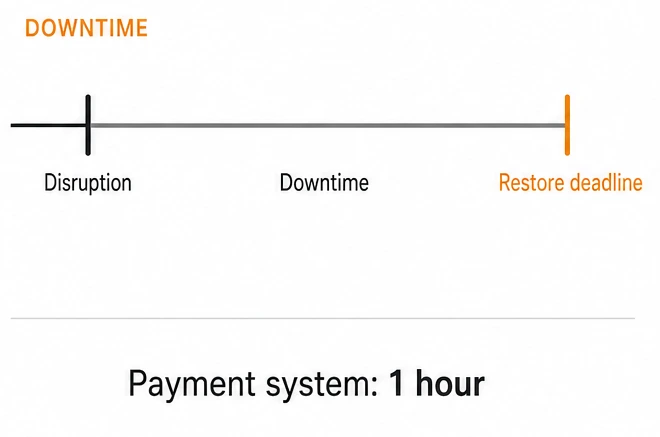
RTO is how quickly a system or process must be restored after a disruption. It answers the question, “How long can this be unavailable before the business takes unacceptable damage?”
Tighter RTO and RPO targets usually require more spending on redundancy, replication, automation, and failover capacity. Looser targets cost less, but they accept more downtime or rework after recovery. For cloud and SaaS systems, achievable RTO and RPO may also depend on provider capabilities and contractual commitments, so those limits should be understood before an incident happens.
Examples:
Online ordering: back within 1 hour.
Internal email: back within 4 hours.
Training portal: back within 24 hours.
Phone support: alternate coverage within 2 hours, full restoration within 8 hours.

Recovery Point Objective (RPO)
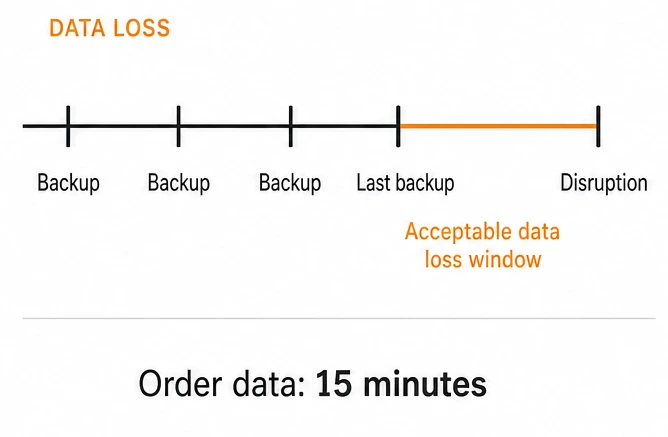
RPO is how much data loss is acceptable, measured in time. It answers the question, “How recent must the last recoverable copy of the data be?”
Examples:
Orders database: lose no more than 15 minutes of transactions.
File shares: lose no more than 4 hours of changes.
Archived training content: losing one day of updates may be acceptable.
Why BCDR is now a cybersecurity issue
Many organizations now activate BCDR because of cyber incidents rather than natural disasters. Ransomware, destructive malware, major breaches, denial-of-service attacks, and cloud service outages can all interrupt operations and damage the very systems relied on for recovery. That changes the planning model because the attacker may deliberately target backups, administrative accounts, management tooling, and recovery workflows.
This is also why BCDR should be coordinated with incident response. Incident response handles detection, containment, eradication, and investigation, while BCDR handles continuity of operations and the structured restoration of services.
A modern BCDR program should assume at least these scenarios:
- Ransomware encrypts production systems and tries to reach backup repositories.
- A breach forces systems offline during containment, investigation, and rebuild.
- A cloud or SaaS dependency becomes unavailable outside direct control.
- An insider mistake or malicious action affects critical data or infrastructure.
- A supplier or software dependency creates a broader service disruption.
What a real BCDR program is made of
A working BCDR program is more than a policy document. It combines business analysis, technical recovery design, clear ownership, testing, and ongoing updates in a cycle similar to what NIST and ISO continuity guidance recommend.

Risk assessment
Risk assessment evaluates what could realistically disrupt operations, including cyber attacks, power loss, facility problems, supplier failures, cloud outages, and key-person dependencies. The goal is not to predict every event but to understand which disruptions deserve planning depth.

BC and DR strategies
Strategies define how each critical process and system will be protected and recovered. That may include backups, replication, alternate sites, remote work procedures, manual workarounds, supplier alternatives, or cloud failover patterns. Dependency mapping belongs here as well, especially for SaaS platforms, identity providers, telecom services, and critical vendors.

Business Impact Analysis (BIA)
The BIA identifies which business processes and supporting systems are truly critical, what dependencies they have, and what the impact looks like if they are unavailable. That impact may be financial, operational, contractual, legal, or reputational.

Documented runbooks
Runbooks turn strategy into action with step-by-step instructions for specific scenarios. Good runbooks are written for real conditions: stressed teams, partial staffing, time pressure, and imperfect information.

Training and exercises
Plans are only credible if people have practiced them. Useful exercises include tabletops, restore tests, communications drills, and occasional live failover or recovery tests for the most critical services.

Governance, review, and updates
Every BCDR program should have an owner, a review cadence, and basic metrics so leadership can see whether readiness is improving or drifting. Plans should be updated after major system changes, vendor changes, staffing changes, and every real incident or near miss.
What it looks like in practice
Concrete scenarios make the difference between a document and an operating capability. These examples show how continuity and recovery fit together.

Continuity in action — a regional outage
A storm cuts power to a regional office for 48 hours.
- Staff switch to remote work using laptops and cloud tools.
- Customer support is rerouted to another region's call center.
- A pre-agreed status page and customer email keep clients informed.
- Critical paper-based workarounds are used for two affected processes.
A typical ransomware recovery sequence. Each step gates the next — services only return once integrity has been validated.


Recovery in action — a ransomware event
A core database server is encrypted by ransomware overnight.
- Affected systems are isolated to stop the spread.
- Servers are wiped and rebuilt from clean images.
- Data is restored from immutable backups taken earlier that day.
- Integrity checks pass, then services come back in priority order.
What separates a plan that works from one that doesn't
Most failures come from stale assumptions rather than missing documents. These habits keep a program practical. A practical program is a program that gets used.

Test the restore, not just the backup
A backup that has never been restored is a hope, not a plan. Run real restores on a schedule and time them.

Keep at least one offline, immutable copy
Ransomware deliberately targets backups. A copy that can't be reached or altered from the production network is what saves you.

Plan for people, not just systems
Who decides? Who calls customers? Who talks to regulators? Roles, contacts, and authority should be written down and known.

Practice like it's real
Tabletop exercises and live drills surface the small problems (missing access, out-of-date contacts, undocumented dependencies) before they matter.

Review after every change and every incident
New systems, new staff, new vendors, real events: each one is a reason to update the plan, not a reason to leave it alone.

Decide what's truly critical first
Not every system deserves the same protection. Spend the budget on the handful of things that would hurt most if they went down.

Assign responsibility
Assign clear ownership and track a few simple metrics, such as restore-test success, runbook coverage for critical systems, and age of emergency contact lists.
WHERE THE COSTS SHOW UP
- Financial. Lost revenue during downtime, emergency vendor fees, ransom decisions made under pressure.
- Operational. Stalled services, exhausted teams, weeks of follow-up work after the incident is technically over.
- Reputational. Customer churn, awkward partner conversations, headlines that outlast the outage itself.
- Legal & regulatory. Breach notifications, fines, and audit scrutiny — especially when recovery times miss contractual SLAs.
The cost of not having a plan
Without BCDR, incidents become decision-making crises. Recovery takes longer, communication degrades, teams improvise under pressure, and customers often learn about the problem from the outside instead of from the organization itself.
A simple planning model helps quantify the risk: if a critical service generates meaningful hourly revenue or supports regulated operations, even a single day of downtime can exceed the cost of basic preparation and testing.
How BCDR fits with other security work
BCDR is closely related to incident response, vulnerability management, backup administration, and security architecture, but it is not the same thing. Incident response is about finding and containing the problem; BCDR is about sustaining operations and recovering in an orderly way.
Security controls such as privileged access management, network segmentation, endpoint protection, and immutable backup design directly improve the odds that BCDR will work when needed.
Minimal BCDR checklist for small and midsize organizations
A smaller organization does not need enterprise complexity to improve resilience. A practical starting point is to complete the following:
- List the 5 to 10 business processes that would hurt most if they stopped.
- Map the systems, vendors, people, and data each process depends on.
- Set rough RTO and RPO targets for each critical system or process.
- Verify backups exist, are protected, and can be restored successfully.
- Keep at least one offline or immutable backup copy.
- Document who decides, who communicates, and who performs recovery tasks.
- Create simple runbooks for top scenarios such as ransomware, cloud outage, office outage, and supplier disruption.
- Run at least one tabletop exercise and one restore test on a defined schedule.
- Review and update the plan after significant changes and after every incident.
THE BOTTOM LINE
BCDR is not paperwork. It is a practical set of commitments: critical services are known, recovery targets are defined, backups are tested, responsibilities are assigned, and the organization has practiced enough to respond under pressure. With those pieces in place, a serious incident is still disruptive, but it is far less likely to become existential.
Want a bit more detail?
Optional reading for anyone who wants to go a step deeper.
No. Backups are part of disaster recovery, but BCDR also covers how people keep operating, how customers are informed, which systems are restored first, and how the organization functions while technology is impaired.
They should be based on business impact, not preference. The right numbers come from understanding how long each process can be disrupted and how much lost data can be tolerated before the cost becomes unacceptable.
Incident response focuses on detecting, containing, and investigating the incident. BCDR focuses on maintaining operations and restoring systems and services afterward.
Yes. Cloud services reduce some infrastructure burdens, but they do not remove dependency failures, identity issues, provider outages, misconfigurations, accidental deletion, or the need for clear recovery priorities and communication plans.
Critical restore paths should be tested on a defined schedule, and exercises should also occur after major changes. The exact cadence depends on business risk, but annual review alone is usually too light for critical systems.

