Cybersecurity Knowledge Base
CyberPedia
Your essential guide to cybersecurity threats, attacks, and defenses. Understand the risks. Protect your business.
Botnet
Reading time: 8 min · Updated May 2026
IN SHORT
A botnet is a network of internet‑connected devices that have been quietly infected with malware and are remotely controlled by an attacker, usually without the owners ever noticing. Together, these devices act as a single, coordinated weapon that can flood websites, send spam, crack passwords, mine cryptocurrency, or spread more malware.
In plain terms: a botnet lets someone else “rent” your equipment behind your back and use it for their own attacks.
 INFECTED DEVICES
Laptops, servers, routers, cameras, phones, cloud VMs, and other IoT gear that keep doing their normal jobs while secretly following an attacker’s instructions.
 ATTACKER CONTROL
A command‑and‑control (C2) system, often distributed or hidden, tells thousands of bots what to do and when.
 COORDINATED ATTACK
The combined firepower of all those devices is unleashed at once on a target: a website, a service, a network, or specific accounts.
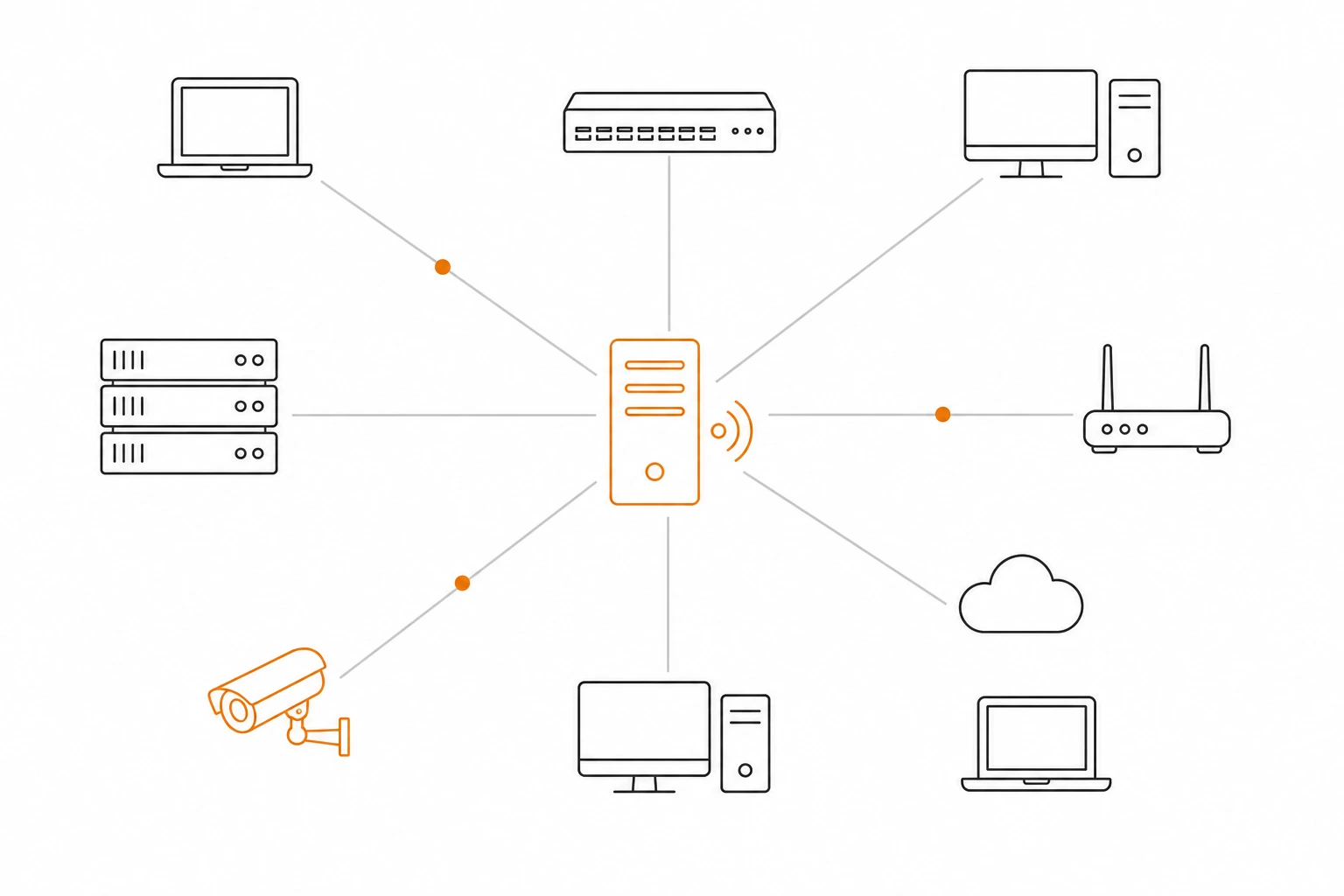
What is a botnet?
Think of a botnet as a remote‑controlled fleet. Each “bot” is an ordinary device, a home router, a small‑business server, a smart camera, a forgotten cloud VM, that has been infected with malware and is listening for commands from an attacker. On its own, each device is unremarkable. Pooled together into the thousands or millions, they become a serious weapon.
The device’s owner typically does not notice anything wrong. The malware is designed to be quiet: a bit of extra network traffic, the occasional spike in CPU usage, maybe the fan spinning harder than usual. Your device keeps doing its job for you while also working a second shift for someone else.
It’s important to separate the two concepts: a malware infection is about a single system being compromised, while a botnet is about coordinated control of many compromised systems at once. Being infected with malware does not automatically mean a device is in a botnet, but many botnets are built by spreading malware.
The name “botnet” comes from “robot” and “network.” The person running it is sometimes called a bot herder or botmaster.
How devices get recruited
Most botnet infections are opportunistic. Attackers cast a wide net, scan the internet constantly, and let weak security do the rest.

Phishing & malicious downloads
A user opens a booby‑trapped attachment, clicks a fake invoice link, or installs a “free” tool or browser extension that quietly drops botnet malware in the background.

Pirated or fake apps
Cracked games, knock‑off productivity tools, shady mobile APKs, and “nulled” plugins frequently bundle hidden bot software alongside whatever they advertise.

Unpatched software & default passwords
Internet‑exposed devices with old firmware or factory credentials, routers, cameras, NAS boxes, printers, VoIP phones, are scanned and compromised within minutes of going online.

Exposed remote access (RDP, VPN, admin portals)
Remote Desktop, web‑based management consoles, and poorly secured VPNs with weak or reused passwords are prime targets for credential‑stuffing and brute‑force attacks.
Once installed, the malware quietly registers the device with the attacker’s control system, often by reaching out to a C2 server or a special domain, and waits for orders.
How a botnet is controlled
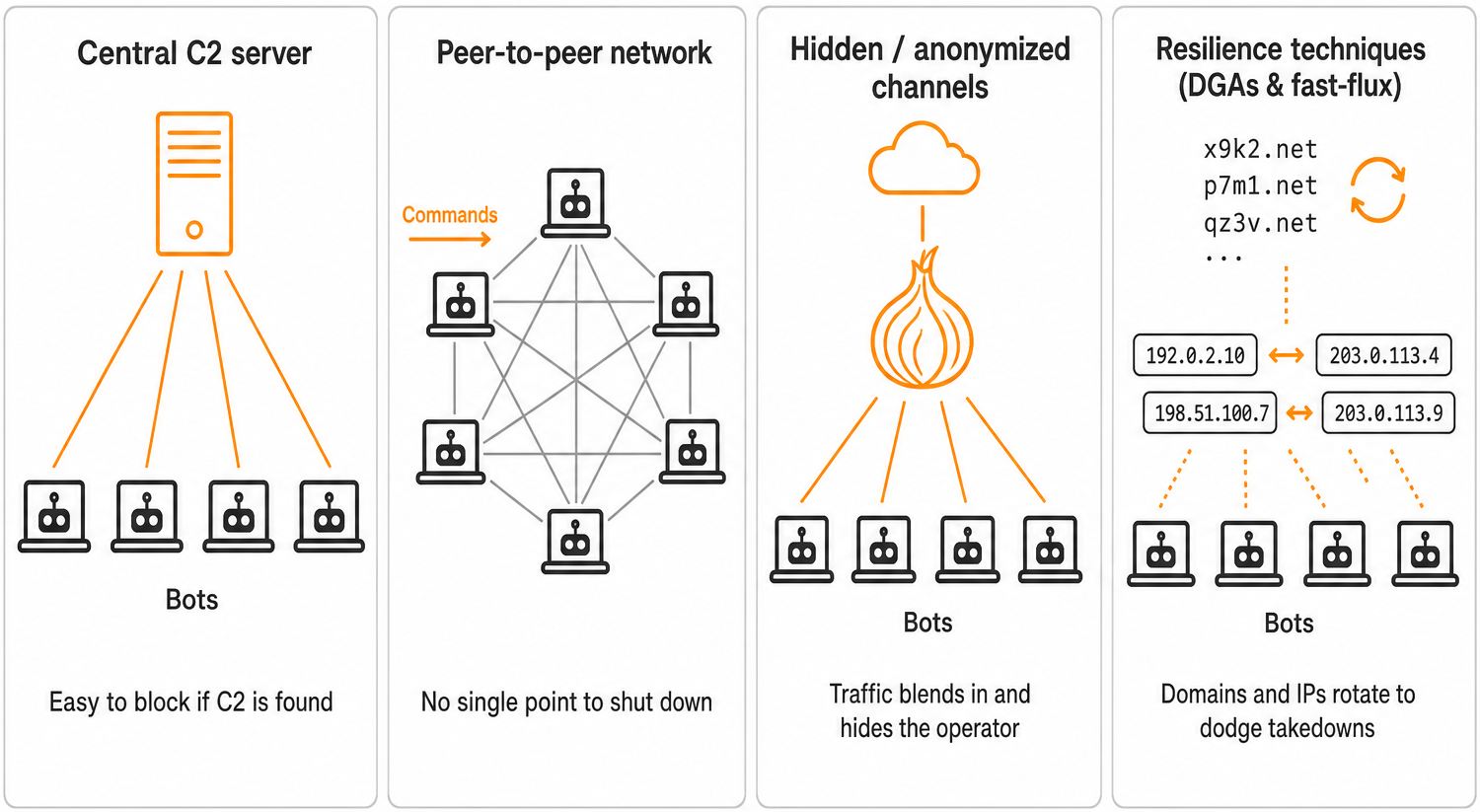
Attackers need a reliable way to reach their bots without exposing themselves. Over time, botnet control has evolved from simple, centralized servers to resilient, distributed networks.

Command & Control (C2) servers
A central server (or a small cluster of them) sends instructions to every bot and receives status updates in return. This is simple and efficient, but if defenders take the C2 infrastructure down or block its domains, the botnet can go quiet.

Peer‑to‑peer (P2P)
networks
Bots talk directly to each other and pass instructions along, often using encrypted channels. There is no single “brain” to shut off, which makes these botnets far harder to dismantle.

Hidden or anonymized channels
Some control traffic rides on anonymizing networks like Tor, or hides inside legitimate cloud services, social‑media posts, or paste sites to dodge takedowns and blend in with normal traffic.

Resilience techniques (DGAs and fast‑flux)
Modern botnets often use domain‑generation algorithms (DGAs) to rotate through thousands of potential domain names per day. This makes simple blocklists much less effective and keeps the botnet online even as defenders block pieces of its infrastructure.
Here's a visual guide:
What botnets are used for
A botnet is a general‑purpose attack platform. Once it exists, it can be rented, repurposed, or pointed at almost any target with relatively little effort.
Disruption and extortion

DDoS attacks
Drowning a website, VPN, or online service in junk traffic from thousands of IP addresses at once until real users can’t get in. This can be used for extortion (“pay or we keep you offline”) or as a smokescreen for other attacks.

Ransomware delivery
Using the botnet to distribute ransomware payloads to new victims, then encrypting data and demanding payment.
Account and data abuse

Credential stuffing & brute force
Taking previously stolen usernames and passwords and trying them across many websites, VPNs, RDP endpoints, and cloud services from many different IPs to slip past rate‑limiting and basic anomaly detection.

Data theft & spying
Quietly harvesting passwords, keystrokes, files, screenshots, or webcam feeds from infected machines and exfiltrating them to attacker‑controlled servers.
Abuse of business processes

Click fraud & ad abuse
Generating fake ad impressions and clicks to siphon money out of online advertising networks or manipulate ad metrics.

Spam and phishing waves
Blasting out millions of fraudulent emails from many different machines and IPs, making them harder to detect and filter.

Crypto‑mining and resource hijacking
Using your servers, cloud instances, and IoT devices to mine cryptocurrency or perform other computationally heavy tasks, driving up power bills and degrading performance.
Why botnets are dangerous for businesses
Organizations face botnets from two directions at once.
AS A TARGET
Pointed at you
Your website, VPN, or portals are hammered by DDoS traffic, credential stuffing, or phishing. Customers can’t log in, staff can’t work, accounts are compromised, and support teams are overwhelmed.
 AS AN UNWILLING PARTICIPANT
Recruited into one
Your servers, PCs, or IoT devices are conscripted into a botnet. Your IPs land on blocklists, your systems slow down, and your organization may appear to be attacking others.
Reputational note: once your IP ranges land on public spam or abuse blocklists, legitimate email and traffic from your network can be silently rejected by other organizations. Cleaning up those listings can take weeks, and the damage can outlast the original infection.
Signs a device, or environment, might be in a botnet
None of these are proof on their own, but a cluster of them is worth investigating.
Unexplained network activity at idle
Steady outbound traffic or unusual connections when nobody is using the device, especially to unfamiliar domains or IP addresses.
Sluggish performance with no clear cause
Fans spinning, CPU pegged, applications feeling slower than usual, or battery life dropping sharply on laptops or mobile devices.


Security tools disabled or failing to update
Endpoint protection turned off, signatures stuck, scheduled scans skipped, or agents mysteriously uninstalling themselves.

Your IPs appearing on blocklists
Bounced emails mentioning spam lists, third parties reporting attacks or login attempts from your addresses, or reputation alerts from email or firewall vendors.

Strange traffic patterns in logs
Firewalls, IDS/IPS, or NetFlow data showing large amounts of outbound traffic to unexpected countries, cloud providers, or known botnet/DGA domains.

Modern botnets are designed to stay quiet. Most infections are spotted by centralized security monitoring. Not by the person using the device.
How to reduce the risk
You can’t make any environment completely immune, but you can make it a much less attractive and much less useful target. At a high level, your goals are to reduce exposed attack surface, harden identity and endpoints, and watch for unusual outbound activity.
Patch everything. Especially the boring stuff
Keep operating systems and applications updated, but don’t forget routers, firewalls, Wi‑Fi access points, cameras, printers, VoIP phones, and other IoT gear. Old firmware on internet‑facing devices is one of the top routes into botnets.
Replace default passwords and add MFA
Never leave a device or service with its factory password. Use a password manager to generate strong, unique credentials, and require multi‑factor authentication (MFA) for VPNs, admin portals, email, and any critical system that supports it.
Use modern endpoint and network protection
Deploy endpoint detection and response (EDR) on workstations and servers, and use network security controls that can spot or block traffic to known malicious infrastructure. Enable DNS filtering and reputation‑based blocking where possible.
Limit unnecessary internet exposure
Close unused ports, disable unneeded services, and avoid exposing RDP or management consoles directly to the internet. Put admin interfaces behind a VPN, and segment IoT and OT devices away from your main business network.
01

02

03

04

05

06

Harden email and web controls
Use email security gateways, SPF/DKIM/DMARC, attachment filtering, and browser isolation or URL rewriting to reduce the odds that a single click leads to compromise.
Train your people
Most infections start with a user action. Ongoing, realistic security awareness training (phishing simulations, short refreshers, and clear “report suspicious activity” channels) pays for itself many times over.
What to do if you suspect botnet activity
When you suspect botnet involvement, move quickly, but in a defined order. The goals are to contain first, understand second, and clean third.
01
Isolate
Disconnect or segment suspicious devices from the network to stop the spread and prevent further abuse. For servers or critical systems, use network isolation (VLANs, firewall rules) rather than hard power‑offs where possible.
02
Scan & clean
Use trusted endpoint protection and malware removal tools to detect and remove the infection. If you’re not confident the system is clean, or if it’s a high‑value asset, plan to rebuild it from known‑good media.
03
Inspect logs
Review firewall, VPN, DNS, proxy, and endpoint logs for unusual outbound connections, odd authentication patterns, or communication with known malicious or newly registered domains.
04
Rotate credentials
Reset passwords for affected accounts, especially any administrative accounts used on compromised machines. Enable or tighten MFA on critical systems and remote access services.
05
Harden & monitor
Patch the vulnerability that let the attacker in, close exposed services, and add detection rules for the domains, IPs, and techniques you observed. Monitor closely for re‑infection or related activity over the following weeks.
THE BOTTOM LINE
Botnets thrive on neglected devices and reused passwords. If you regularly patch what you own, lock down what’s exposed, harden your identities, and watch what leaves your network, you make yourself a far less useful recruit for someone else’s zombie army.
Want a bit more detail?
Common follow-up questions about botnets.
Yes. Routers, especially consumer‑grade routers used in homes and small offices, are some of the most popular recruits. They’re online 24/7, often run outdated firmware, and are frequently left with factory default passwords or remote management enabled. Famous botnets have grown to hundreds of thousands of devices largely by compromising inexpensive routers and IP cameras. For businesses, this risk extends to the little boxes no one thinks about: branch‑office routers, guest Wi‑Fi gear, older VPN appliances, and smart cameras watching your lobby or warehouse.
Traditional antivirus is necessary but not sufficient. Many modern botnets use techniques that evade simple signature‑based detection, such as:
- Fileless malware that lives mainly in memory.
- Encrypted communication channels that look like normal HTTPS traffic.
- Legitimate system tools (PowerShell, WMI, scheduled tasks) to persist and communicate.
You get much better coverage by combining next‑generation endpoint protection (EDR), DNS and network‑based detection, strong patching practices, and good logging. These controls together can spot both the malware and the unusual outbound behavior it creates.
“Virus” is a type of malware that can replicate itself by infecting other files or systems, often without user interaction. It describes how the malware spreads.
A botnet describes what the attacker does with infected systems: they are linked together into a controllable network that can receive commands and act in concert. Many botnets are built from trojans, worms, or other malware families, not necessarily classic file‑infecting viruses.
You can think of it this way: a virus is a method of infection and propagation; a botnet is an infrastructure built from infected machines.
Fix the root cause first – Identify and clean any infected systems, close exposed services, and rotate passwords. If you request removal while the infection is still active, you’ll likely end up re‑listed.
Verify your email and network posture – Implement SPF, DKIM, and DMARC for your domains, and ensure your mail servers are correctly configured and not open relays.
Check major blocklists – Use tools or your mail provider’s portal to see which lists you’re on.
Follow each list’s delisting process – Many offer web forms where you can explain what you fixed and request removal.
Monitor for recurrence – Watch logs, reputation dashboards, and bounce messages for signs you’ve been re‑listed.
This process can take days to weeks, which is why proactive hardening and monitoring are far cheaper than dealing with the aftermath.
Absolutely. Small and midsized businesses see many of the same botnet‑driven attacks as large enterprises. Just with fewer people watching the logs. Automated scanners and credential‑stuffing tools don’t care how many employees you have; they care whether your systems are exposed and easy to abuse.
In practice, we see botnet‑related activity regularly against local organizations in sectors like healthcare, legal, manufacturing, and professional services. Strong basics (patching, MFA, segmentation, and good monitoring) go a long way toward keeping your business from becoming either a victim or an unwitting accomplice.
Continue learning
Explore related topics in the Argus CyberPedia.
Blue Team
How defenders organize to detect, contain, and eradicate threats like botnets before they take root in your environment.

Breach
What happens when attackers get in, how incidents unfold, and how incident response teams clean up after botnet‑delivered malware or data theft.
