Cybersecurity Knowledge Base
CyberPedia
Your essential guide to cybersecurity threats, attacks, and defenses. Understand the risks. Protect your business.
Adversary-in-the-Middle (AiTM)
Reading time: 8 min · Updated May 2026
IN SHORT
An Adversary-in-the-Middle (AiTM) attack is a modern account takeover technique in which an attacker silently inserts themselves between a user and a legitimate website or cloud service. The victim believes they are signing in normally, but the attacker can relay the login in real time, capture credentials, and steal the session cookie or token that keeps the user signed in. That is what makes AiTM especially dangerous: the attacker often does not need to “break” the service or directly defeat MFA. Instead, they steal the authenticated session after the user completes the login process, which can allow them to access the account as if they were the real user.
What is an Adversary-in-the-Middle attack?
“Adversary-in-the-Middle” describes an attack in which someone secretly places themselves between two parties that believe they are communicating directly. Once in the middle, the attacker may observe, relay, log, alter, or inject traffic, depending on the type of attack and the environment involved.
You may also hear the older term “man-in-the-middle” or MITM. In modern security guidance, AiTM is often used to describe the same general concept, especially in identity and phishing scenarios where the attacker actively proxies a live sign-in session.
In a modern business setting, AiTM often appears in phishing campaigns aimed at services such as Microsoft 365, Google Workspace, banking portals, payroll platforms, or other cloud applications. The attacker usually does not need to exploit the service itself; they only need to trick the user into signing in through attacker-controlled infrastructure that quietly relays the real login process in the background.
The result is what makes AiTM so deceptive: the sign-in may appear completely successful to the user, while the attacker captures the same authenticated session at the same time.
The result: the sign-in works. The user gets in. And so does the attacker.
How it works, step by step
Most AiTM attacks follow the same simple pattern. Here is what typically happens behind the scenes.
Lure
The victim receives an email, text message, chat message, shared document, or notification with a malicious link. It is often framed as something routine, such as a shared file, calendar invite, account verification, voicemail, payment request, or password reset.
Session theft
When the legitimate service accepts the login, it creates an authenticated session. That session is typically represented by a session cookie or token that tells the service the user has already been verified. The attacker copies that session data and can then reuse it to access the account without needing to restart the login process.
Relay
As the user types a username, password, and possibly a one-time code or approves an MFA prompt, the attacker’s system passes each step to the legitimate service in real time. The victim often sees what looks like a normal sign-in experience because the real service is still responding through the attacker’s relay.
Fake page
The link opens a sign-in page that looks legitimate or routes the user through a convincing workflow. Behind the scenes, the attacker-controlled page is relaying traffic to the real service while collecting what the user enters.
01

02
03
04


What it looks like vs. what's really happening
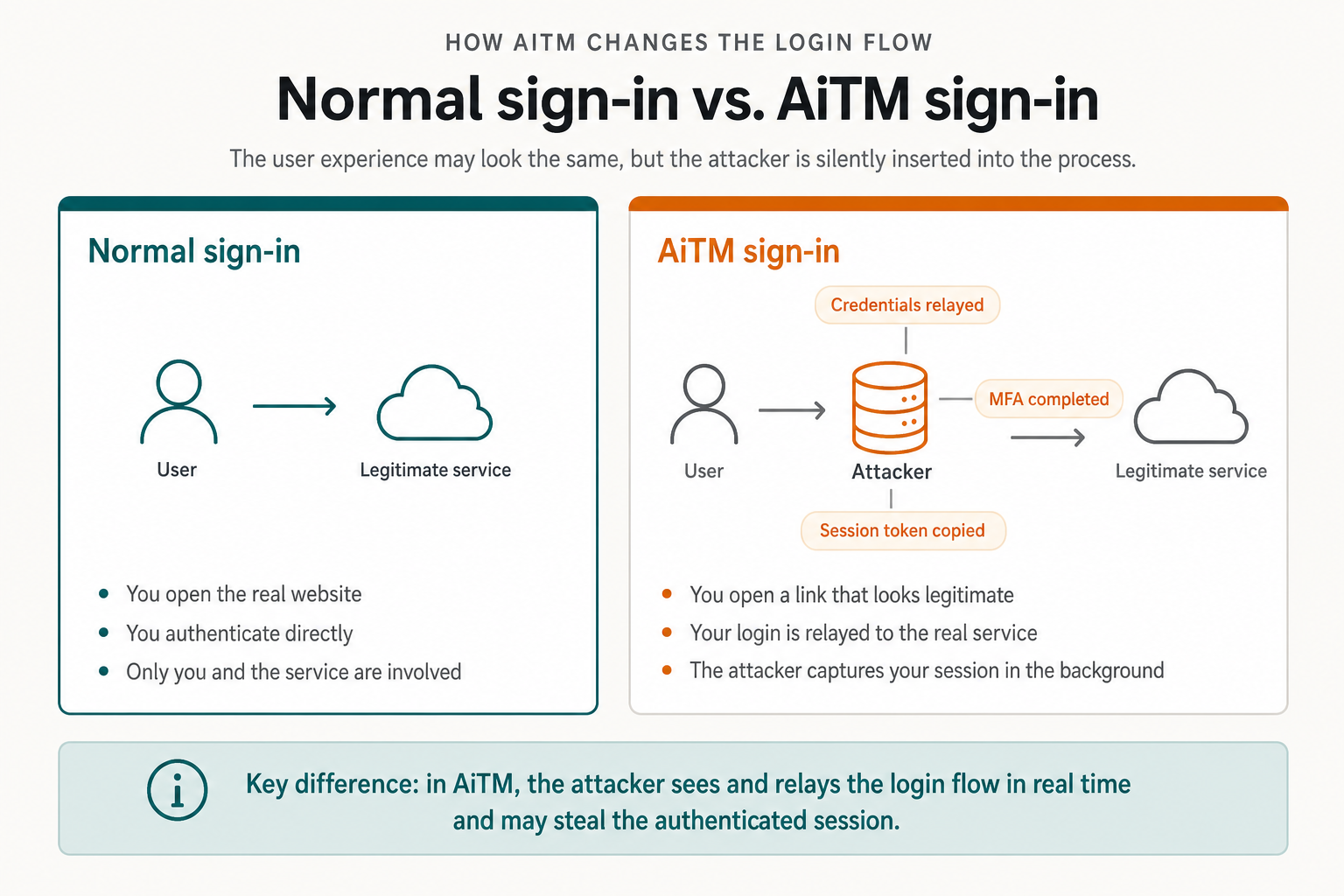
From the user’s point of view, an AiTM sign-in may feel completely normal. That is why it is so effective: the warning signs are often subtle, and the user may still reach the expected application after logging in.
Normal sign-in
You open the real website, enter your credentials, complete MFA if required, and the service signs you in. Only you and the legitimate service are involved in the authentication flow.
AiTM sign-in
You open a link that appears to lead to the real website, enter your credentials, and complete MFA. The service still signs you in, but the process has been relayed through attacker-controlled infrastructure, allowing the attacker to capture credentials and the authenticated session in the background.
What the attacker walks away with

Your credentials
The attacker may capture your username and password the moment you enter them. Those credentials may be reused immediately, tested against other services, or sold to other threat actors.

Your session cookie or token
The session cookie or token is often the real prize. It tells the service that the user has already authenticated, and if an attacker steals it, they may be able to access the account from their own browser without repeating the login flow.

Access to your account
Once the attacker has a valid session, they may be able to read email, send messages, create inbox rules, access files, review financial documents, change settings, or pivot into additional systems tied to that identity.
Why AiTM is a serious business risk
AiTM is dangerous because it bypasses many of the protections people assume are enough on their own. The attacker is not always trying to guess the password or force entry; they are often stealing a legitimate authenticated session and then operating inside it.
In cloud identity environments such as Microsoft 365 or Google Workspace, one stolen session can quickly lead to mailbox access, sensitive file exposure, payroll or finance fraud, customer data theft, or further compromise of connected applications. Because the activity may be tied to a valid session, detection can be harder than with a simple failed-login attack.
REAL-WORLD BUSINESS IMPACT
Business email compromise and invoice fraud.
Wire transfer redirection and payment manipulation.
Quiet access to email, calendars, files, and shared documents.
Theft of customer, employee, or financial data.
A foothold for broader identity abuse, ransomware staging, or additional attacks.
Does MFA still help?
Yes, but not all MFA offers the same protection against AiTM. Traditional MFA still reduces many common account takeover risks, but AiTM attacks can succeed when the attacker captures the authenticated session after the user completes the challenge.
That does not mean MFA is useless or “broken.” It means organizations should avoid assuming that any MFA method is equally resistant to phishing and session theft. Microsoft and other security authorities recommend moving toward phishing-resistant authentication methods because AiTM attacks do not work the same way against those controls.
STRONGER DEFENSES
Passkeys.
Hardware security keys.
Certificate-based authentication.
Windows Hello for Business or other phishing-resistant sign-in methods where appropriate.
Warning signs to watch for
AiTM is designed to feel normal, but small details often give it away. Teach users to slow down and question unexpected sign-in requests, even if the login screen appears familiar.

A login link arrived unexpectedly
You were not planning to sign in, but a message is urging you to open a file, approve a payment, verify your identity, or review a document.

The web address looks slightly off
Misspellings, unusual domains, odd subdomains, or long random-looking URLs can all be warning signs.

An MFA prompt you didn't trigger
An unplanned push approval or repeated authentication prompts should always be treated carefully.

Unusual activity afterward
New inbox rules, unfamiliar sent mail, login alerts, unexpected sign-outs, or settings changes may indicate compromise.
If something feels off, stop the sign-in process and report it.
Investigating a suspicious attempt early is far easier than responding after an attacker has already taken over an authenticated session.
What to do if you think this happened
If you suspect an AiTM attack, respond as though the account may already be compromised. A password reset alone may not be enough if an attacker is still using a stolen authenticated session.
Immediate response steps
Stop using the affected session and report the incident immediately.
Revoke active sessions and sign out of all devices.
Reset the password and review MFA settings for the affected account.
Check for new inbox rules, unexpected sent mail, forwarding settings, and suspicious file activity.
Review sign-in logs for unfamiliar locations, devices, and session behavior.
Investigate for signs of follow-on fraud, especially payment requests, vendor changes, or business email compromise activity.
The faster a compromised session is revoked, the better the chance of limiting damage. Microsoft has reported cases in which attackers moved from session theft to payment fraud within minutes.
How organizations defend against AiTM
No single control eliminates AiTM risk by itself. The strongest defense is layered: make the attack harder to land, make stolen sessions less useful, and make suspicious activity easier to detect and contain.
01

Conditional access and device trust
Require access from trusted users, managed devices, approved locations, and expected sign-in contexts wherever practical.
Shorter session lifetimes and re-authentication
Shorter session lifetimes, re-authentication policies, and strong session controls can reduce how long a stolen session remains useful.
Active monitoring of identity activity
Watch for impossible travel, suspicious devices, token anomalies, new MFA registrations, inbox rule creation, and unusual mailbox or file access.
Practical user awareness
Short, practical, repeated training that focuses on real scenarios rather than generic phishing tips.
Phishing-resistant authentication
Move toward sign-in methods that can't be relayed, such as passkeys or hardware security keys, especially for administrators and finance staff.
02

03

04

05

THE BOTTOM LINE
AiTM works because it hides inside something that already feels normal: signing in. The user may do everything they think they are supposed to do, including completing MFA, while an attacker quietly captures the session in the background.
The most effective defenses combine phishing-resistant authentication, strong identity controls, active monitoring, and staff who feel comfortable reporting anything unusual. For many organizations, especially those using Microsoft 365 or Google Workspace heavily, AiTM is a reminder that protecting the login process is not just about passwords anymore. It is about protecting the session itself.
Want a bit more detail?
Optional reading for anyone who wants to go a step deeper into how AiTM works and where it fits in the wider threat landscape.
Traditional phishing often tries to steal credentials directly and use them later. AiTM phishing goes further by relaying a live sign-in session and capturing the authenticated session cookie or token, which can let the attacker step into the account immediately.
AiTM can bypass many traditional MFA workflows by stealing the session after the user successfully completes authentication. That is why phishing-resistant MFA is so important: it is designed to prevent this kind of relay attack from succeeding.
A session cookie or token is a small piece of data that tells a service the user has already authenticated. If an attacker steals it, they may be able to reuse that authenticated session without having to enter the password or MFA code themselves.
You might notice suspicious login activity, unusual inbox rules, unexpected sent mail, new MFA prompts, odd sign-ins from unfamiliar locations, or signs of unauthorized access to files and cloud applications. In many cases, the clearest signals appear after the sign-in rather than during it.
Report it immediately, stop using the session, revoke active sessions, reset credentials, and review account activity for signs of misuse. Treat it as a potential account takeover event, not just a suspicious email.

