
Businesses that rely on Facebook for marketing are being heavily targeted by phishing campaigns that impersonate Meta programs and partner invitations. In this post, we’ll walk through a real attack Argus Cybersecurity and Support investigated, step‑by‑step, using screenshots from the original email through to the hidden phishing infrastructure.
Step 1: A convincing email from “Meta for Business”
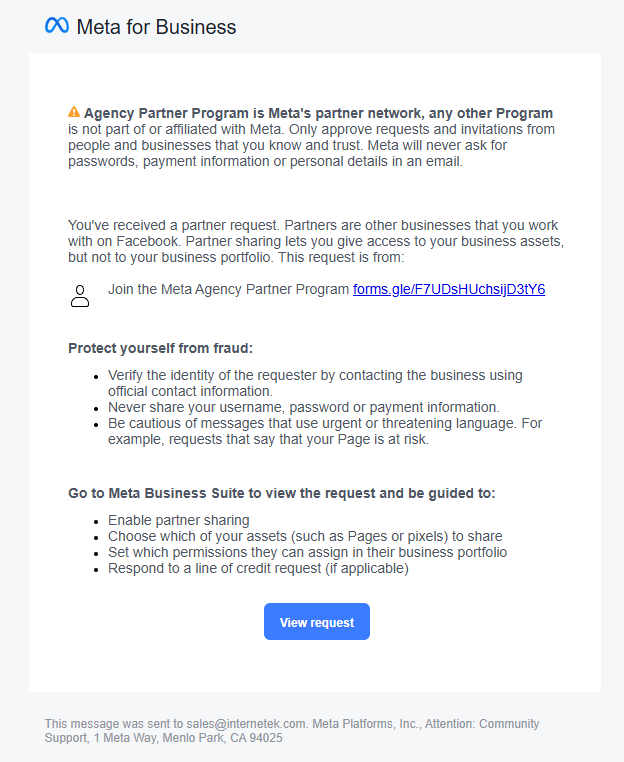
The attack began with what looked like a legitimate “Meta for Business” notification titled Meta Agency Partner Program. The email explained that our agency had been selected for a special partner program and included a “View request” button plus a link labeled “Join the Meta Agency Partner Program.”
From a quick glance, everything looked normal: proper Meta branding, a genuine‑looking footer, and a sender that matched what you’d expect from Facebook’s notification system. This “close enough” look is exactly what many recent Meta‑themed phishing campaigns rely on.
However, the email itself contained a clue most users miss: Facebook’s own warning reminding recipients not to trust partner invitations without independent verification and to never share passwords or payment information via email. Attackers are abusing these real notification flows to piggyback on Meta’s infrastructure and credibility.
Key red flags at this stage:
The invitation came through as a generic partner request, not something initiated inside our Business Manager.
The call to action pushed us toward an external link instead of directing us to log into Business Suite independently.
Step 2: From Facebook to… Google Forms
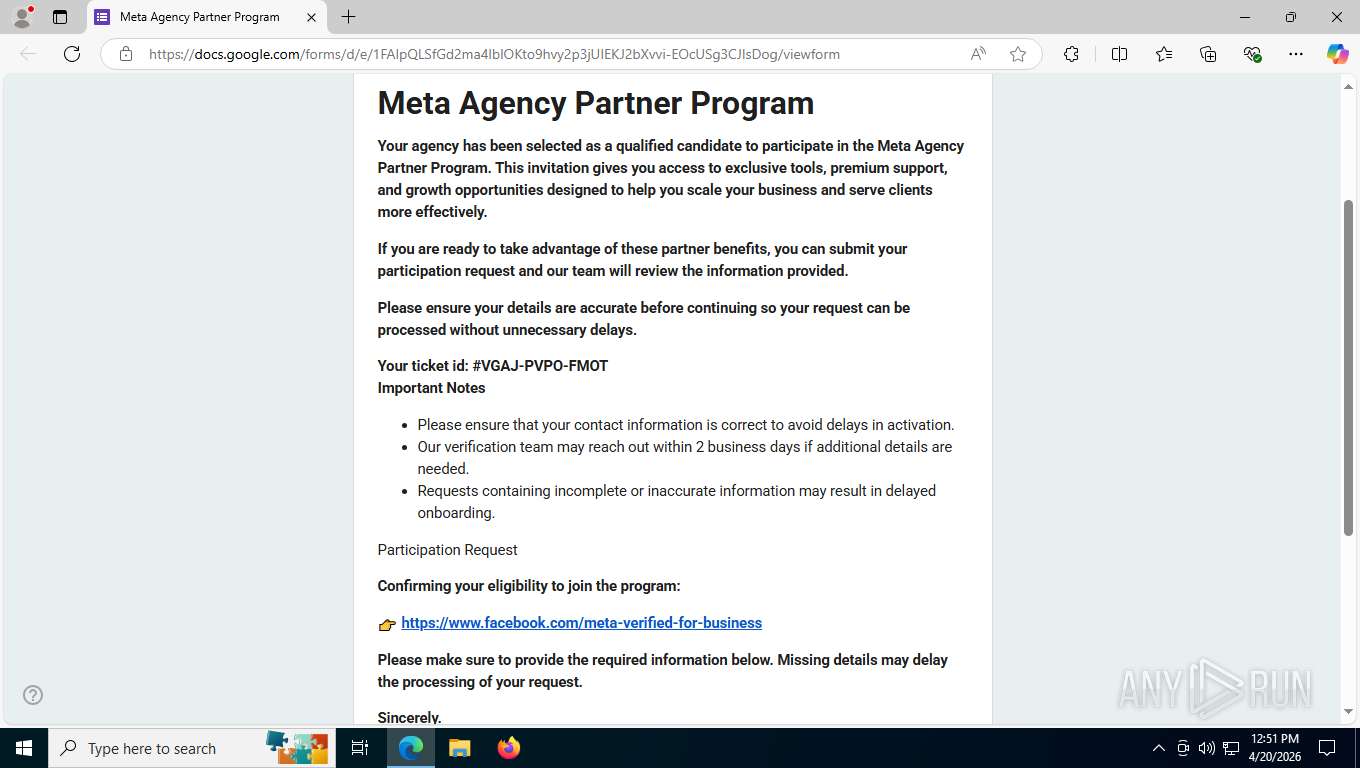
Clicking the invitation didn’t send us to Meta at all. Instead, the embedded link opened a Google Forms page titled Meta Agency Partner Program. Meta does not run its partner onboarding through random third‑party forms, and the combination “Meta + Google Form” is inherently suspicious.
The form copied Meta’s tone and used a fake ticket ID to sound official. Buried inside the text was another link that looked like it went to https://www.facebook.com/meta-verified-for-business, but that text link actually pointed to https://shorten.is/metasupportads. This is a classic trick: show a trustworthy domain in the anchor text while sending the user somewhere completely different.
Red flags here:
Use of Google Forms to collect “Meta” partner information.
Mismatch between the visible Facebook URL and the actual link destination (a shortening service).
Step 3: The link shortener detour
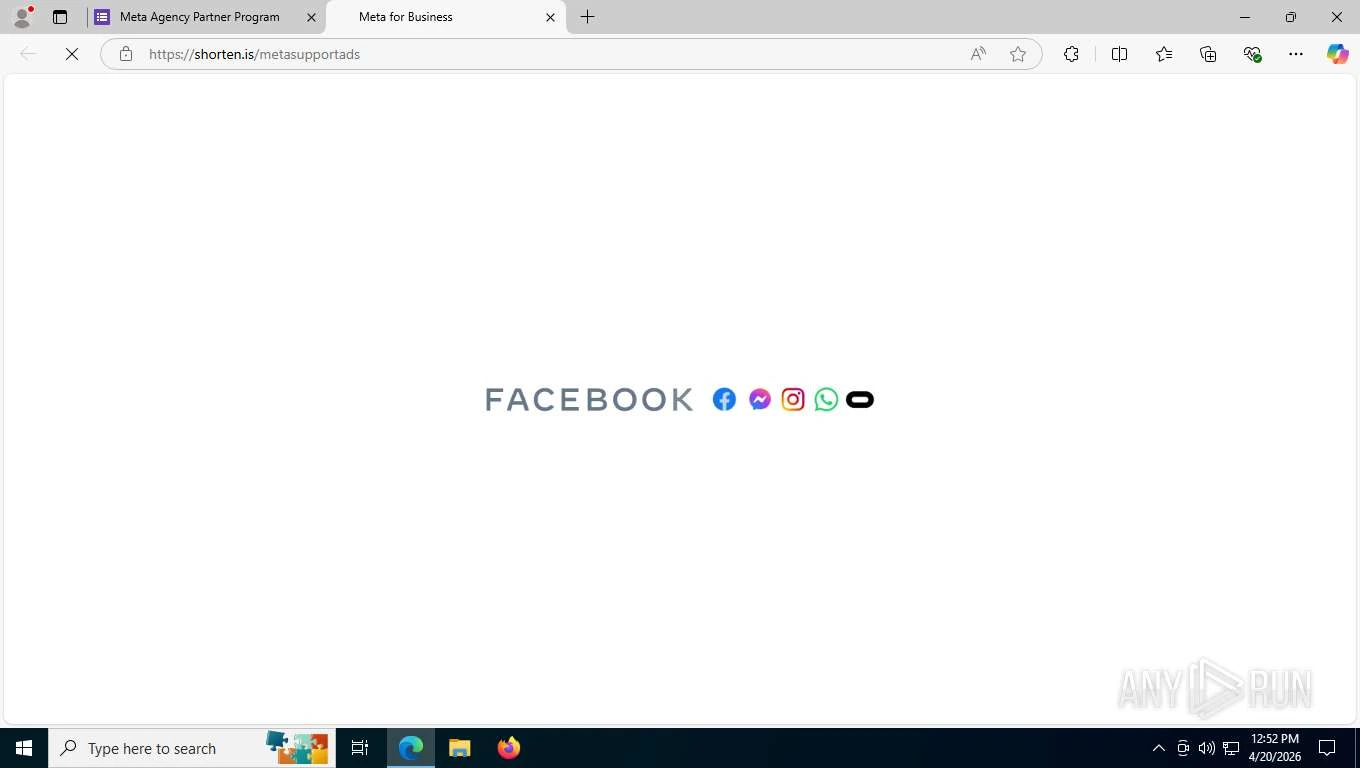
Next, the shorten.is URL redirected us again, ultimately loading what appeared to be a Meta Privacy Center branded page. Threat actors frequently use link shorteners such as shorten.is to obscure the true destination and make it harder for both users and automated filters to spot malicious domains.
At this stage, the attacker has:
Started from a legitimate‑looking Meta notification.
Handed off to a Google Form that looks administrative.
Pushed the victim through a shortened URL to hide the final phishing site.
That multi‑step chain is designed to wear down your suspicion. Each step feels just legitimate enough to keep you clicking.
Step 4: A polished fake Meta Privacy Center
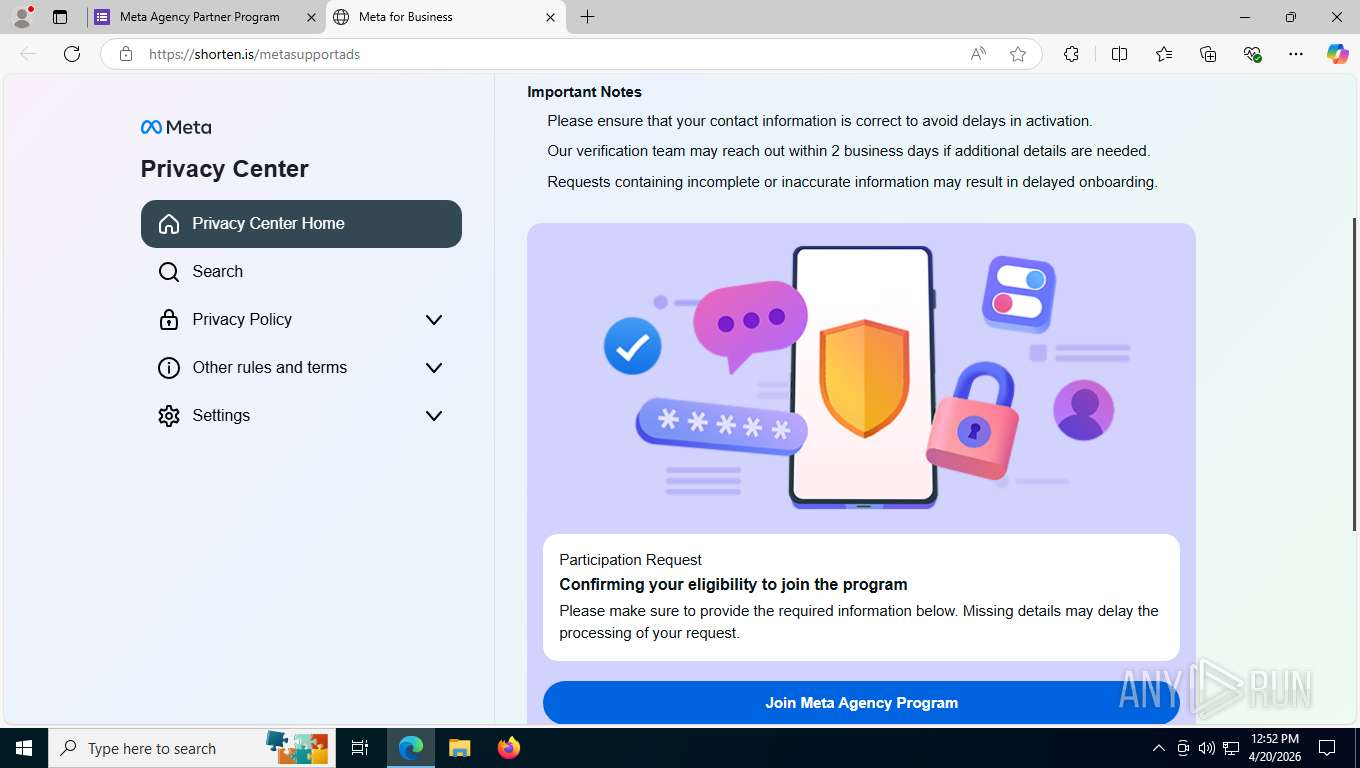
Once the shortened link finished loading, we landed on a page that looked remarkably like Meta’s official Privacy Center. The page used Meta’s correct logo, color palette, icons, and layout, even including collapsible menu sections such as “Privacy Policy,” “Other rules and terms,” and “Settings” to create a sense of depth and authenticity.
But a closer look revealed some important tells:
None of the navigation links actually worked; only the main Join Meta Agency Program button was functional.
The content was generic and reused; it did not match the exact structure or behavior of Meta’s genuine privacy center pages.
This is a common pattern in modern phishing kits: attackers invest heavily in visual polish and animation while neglecting “non‑critical” functionality that victims are unlikely to test.
Step 5: The information‑harvesting form
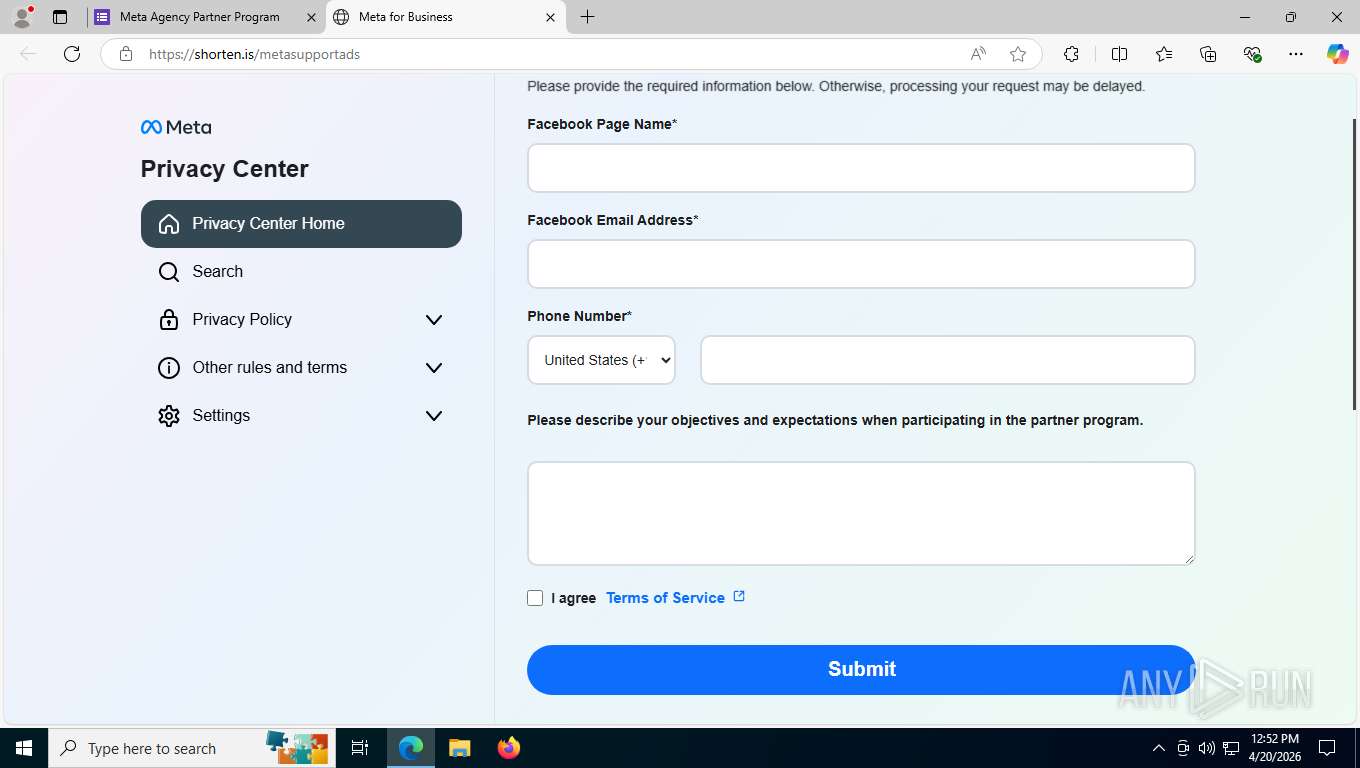
Clicking Join Meta Agency Program brought up a form embedded in the same fake Privacy Center page. The form requested:
Facebook Page Name
Facebook Email Address
Phone Number
Objectives and expectations for participating in the program
From an attacker’s perspective, the first three fields are gold: they capture the exact account identity, the email (often the login username), and a working phone number for social‑engineering or account‑recovery attacks. Modern campaigns against Meta business accounts increasingly collect this combination of data to enable targeted credential theft and takeover.
The “objectives” field is likely filler to make the form feel more legitimate, while the “Terms of Service” link went nowhere. Another tell that authenticity was not the priority.
Step 6: The password prompt and likely proxy
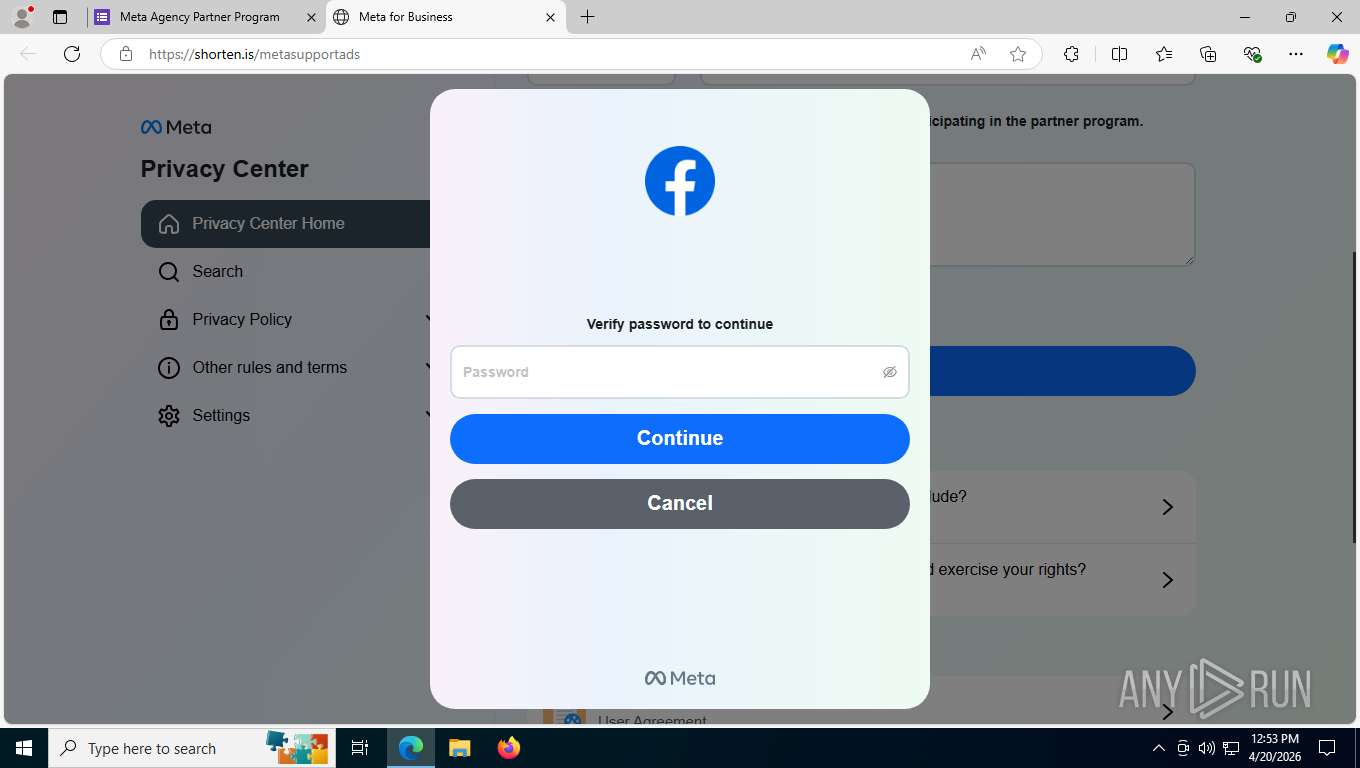
After submitting the initial form, the page displayed a familiar Meta‑style dialog prompting us to “Verify password to continue.” At this point, the attackers have everything they need to attempt account takeover:
Page identity
Email/username
Phone number
Now, the password
What makes attacks like this more dangerous is that they increasingly operate as full adversary‑in‑the‑middle (AitM) proxies, relaying login requests to the real Facebook site and capturing credentials and session tokens in real time. In this case, submitting a fake password resulted in a “password wrong” message, which strongly suggests the page was testing the password against the live Facebook login process. That behavior aligns with what researchers have observed in recent Meta business phishing campaigns that validate credentials instantly before moving on to session hijacking.
If a victim supplies their real password here, attackers can:
Log into the account directly or via the proxy.
Take over the business page and ad accounts.
Change recovery options and lock out the legitimate owner.
Abuse the compromised account to run scams or spread malware to followers.
Step 7: Lifting the hood – the hidden domain
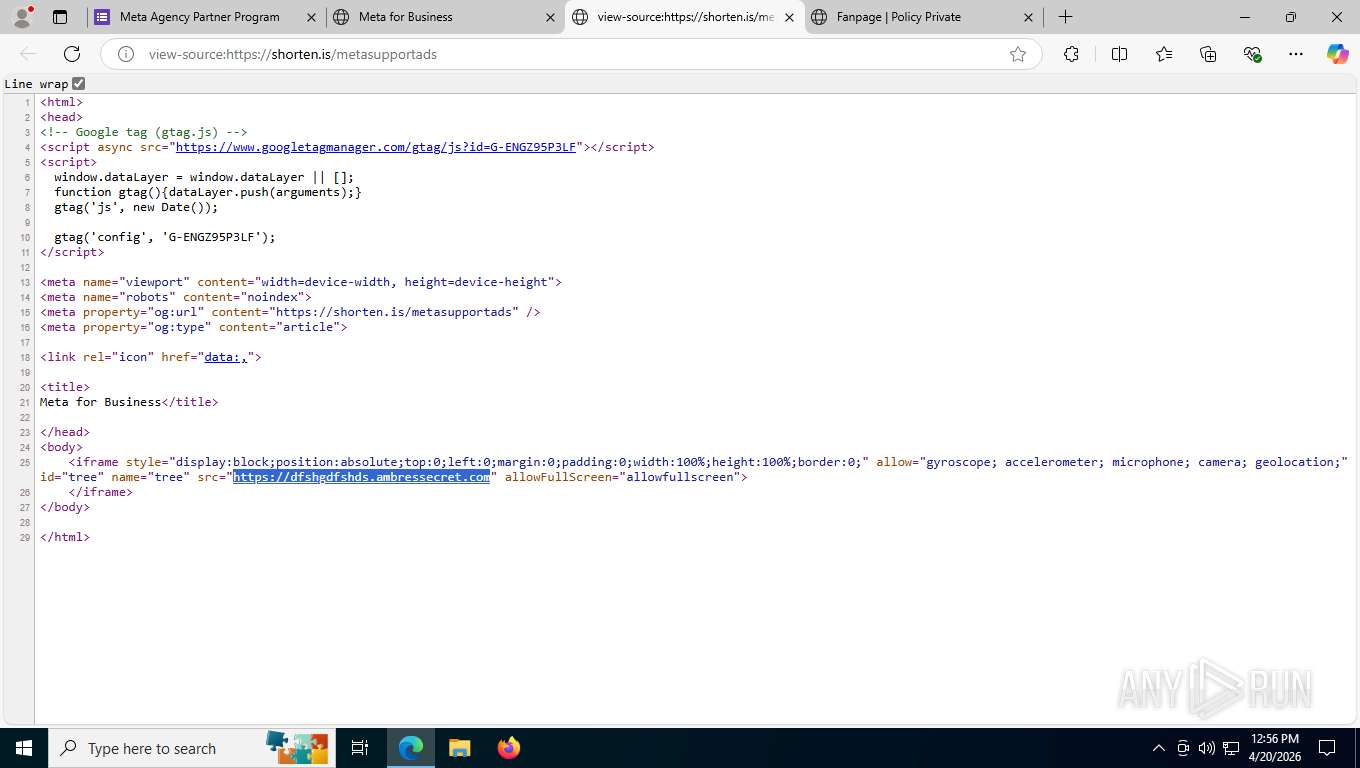
Finally, we inspected the HTML source of the shorten.is page. The code revealed an iframe pointing to:
https://REDACTED.ambressecret.com
This is the true origin of the phishing content; the shorten.is link exists purely to hide this suspicious domain behind a short, generic URL. The combination of a nonsense subdomain and an unrelated parent domain is typical of infrastructure spun up quickly for phishing campaigns.
This structure gives the attackers three layers of indirection:
Facebook/Meta partner invitation email.
Google Form “Meta Agency Partner Program” page.
Shorten.is redirect to the real phishing host at ambressecret.com.
Every layer adds credibility for the victim and complexity for defenders.
What Argus did next
Once we confirmed this was a phishing chain, Argus Cybersecurity and Support:
Preserved evidence of every step (email, Google Form, shorten.is landing page, and source HTML).
Reported the malicious use of Google Forms, shorten.is, and the ambressecret.com domain to Meta/Facebook, Google, and Shorten.IS.
Submitted abuse reports so the hosting providers could take the pages offline and break the attack chain for future recipients.
Blocked the attack page from being accessed by our clients.
These coordinated takedowns are important because this is not an isolated incident. Security researchers have documented large‑scale campaigns abusing Meta’s business notifications and external domains, including URL shorteners, to target small and midsize businesses worldwide.
How to protect your Facebook business assets
If you manage Facebook or Meta business properties, here are practical steps you can put in place today:
Never trust links in “urgent” Meta emails. Access Meta Business Suite or Facebook directly via a bookmark or by typing the URL instead of clicking embedded links.
Be suspicious of third‑party forms. Meta will not ask you to complete account‑sensitive actions via Google Forms or similar services.
Inspect links before you click. Hover over the link and confirm the domain really belongs to Meta (for example facebook.com or meta.com) and is not hidden behind a URL shortener.
Watch for partial functionality. Pages where only one button works (and all navigation is dead) are often phishing kits with just a single malicious flow wired up.
Enable multi‑factor authentication (MFA) on all admin accounts. This significantly raises the bar for attackers trying to turn stolen passwords into account takeover.
Train your team. Many of these campaigns target agencies and small businesses, sending repeated partner invitations that look routine. A short internal briefing with screenshots goes a long way.
Have an incident playbook. If someone does click or enter credentials, immediately change the password from a known‑good device, revoke active sessions, review ad spend and page roles, and notify your security partner.
Closing: Why this matters for your business
Meta business accounts are high‑value targets: compromising one gives attackers access to your audience, your brand, and often your credit card. Recent campaigns show that adversaries are willing to piggyback on legitimate Meta infrastructure, Google services, and URL shorteners to get you to hand over the keys willingly.
At Argus Cybersecurity and Support, we continuously monitor for attacks like this, validate suspicious emails and links, and work with providers to take down malicious infrastructure. If your organization relies on Facebook or Instagram for revenue, now is the time to harden your account security, educate your team, and establish a clear process for handling questionable Meta notifications.
If you’d like help reviewing your Meta account security posture or implementing protections against phishing campaigns like this, reach out to our Argus team. We’re here to help keep your business assets under your control.